
Last reviewed: January 2026

Introduction
Finding the best IPTV Australia 2026 option has become a priority for thousands of Aussies tired of paying premium prices for traditional pay TV. With Foxtel packages climbing past $100 per month and NBN speeds now capable of handling multiple 4K streams, more households are exploring internet-based TV alternatives that deliver live sport, movies, and international channels at a fraction of the cost.
But here’s the challenge: the IPTV and streaming market is a mix of legitimate, licensed services and dodgy, unlicensed providers that can expose you to legal trouble, security risks, and unreliable streams that drop out during the AFL grand final. In this guide, I’ll walk you through how to identify genuinely legal IPTV and streaming services, match them to your NBN speed tier, and avoid the common pitfalls that leave Aussie viewers frustrated.
Whether you’re on NBN25 watching on a budget, NBN50 streaming in HD, or NBN100 chasing 4K sport, you’ll find practical, tested advice here—focused entirely on safe, licensed options.

On This Page
- What is the best IPTV Australia 2026 option right now?
- How did we test legal IPTV and streaming services for Australians?
- Best IPTV Australia 2026: Quick comparison of legal providers
- Is IPTV legal in Australia in 2026?
- How to choose the right legal IPTV for your NBN speed
- Common IPTV and streaming problems in Australia and how to fix them
- How to spot an illegal or risky IPTV provider
- FAQ
What is the best IPTV Australia 2026 option right now?
The best IPTV and streaming option for most Australians in 2026 depends on what you watch most. For live sport, Kayo Sports remains the top legal choice with AFL, NRL, cricket, and motorsport. For movies and general entertainment, Binge and Stan offer strong libraries. For a traditional pay TV experience over the internet, Foxtel Now and Fetch TV provide licensed, reliable alternatives to cable.
In several years of testing legal streaming services across Australian NBN connections, I’ve found that no single provider covers everything perfectly. Sport lovers almost always need a dedicated sports streaming service, while households wanting movies and drama benefit from bundling two or three affordable platforms. The good news is that most legitimate services now offer no-lock-in monthly plans, so you can trial them without long-term commitment.
Top Legal Streaming and IPTV Options for Australians (2026)
| Provider | Best For | Approx. Monthly Cost | Free Trial | Max Quality | Device Support |
|---|---|---|---|---|---|
| Kayo Sports | Live Aussie sport (AFL, NRL, cricket) | $28–$35 | 7 days | 1080p | Smart TV, Fire Stick, Android TV, mobile |
| Foxtel Now | Premium sport + entertainment bundle | $49–$104 | 10 days | 1080p/4K (select) | Smart TV, Chromecast, Apple TV, mobile |
| Binge | Movies, HBO, drama series | $10–$22 | 14 days | 4K HDR | Smart TV, Fire Stick, Android TV, Chromecast |
| Stan | Aussie content, Stan Sport (tennis, rugby) | $12–$21 (+$15 for Stan Sport) | 30 days | 4K HDR | Smart TV, Fire Stick, Android TV, gaming consoles |
| Fetch TV | Set-top box with live channels + apps | $6–$16/month (+ hardware) | Varies | 4K | Fetch box, some smart TVs |
Looking for a stable IPTV service that actually works on Australian NBN?
Explore our recommended solution here.
How did we test legal IPTV and streaming services for Australians?
We tested each legal streaming and IPTV service on real Australian NBN connections over a six-month period, using NBN25, NBN50, and NBN100 plans from multiple ISPs. Testing included peak-hour performance between 7pm and 10pm, device compatibility across smart TVs, Fire Stick, Android TV boxes, and mobile devices, plus ease of signup, cancellation, and customer support responsiveness.
When I tested these platforms on NBN50 and NBN100 connections during evening congestion windows, I paid close attention to buffering frequency, stream quality consistency, and how quickly each service adapted when bandwidth dropped. I also tested on NBN25 to simulate what budget-tier users experience—particularly relevant for households in regional areas or those on cheaper plans.

Testing Criteria
- Stream stability at peak hours: Did the service buffer or drop quality between 7pm and 10pm when Australian internet traffic peaks?
- Startup speed: How long from pressing play to watching content?
- Device app quality: Were apps responsive and easy to navigate on Fire Stick, smart TVs, and mobile?
- Live sport latency: For sports streaming, was there noticeable delay compared to free-to-air TV?
- Customer support: How easy was it to get help with billing or technical issues?
What we found
Licensed, mainstream services like Kayo, Binge, Stan, and Foxtel Now consistently performed well even during congested periods. They invest in Australian CDN (content delivery network) infrastructure, meaning streams are served from local servers rather than overseas.
Smaller or newer legal services sometimes struggled at peak hours, but major platforms rarely buffered on NBN50 or above.
Best IPTV Australia 2026: Quick comparison of legal providers
For Australians searching for the best IPTV Australia 2026 solution, legal streaming services now cover almost every content category—from live sport to international channels to on-demand movies. Below is a quick breakdown of which licensed providers suit different viewing priorities, helping you choose without wading through marketing hype.
In my experience testing these services over several years, the biggest satisfaction comes from matching your actual viewing habits to a provider’s strengths. There’s no point paying for a premium sports bundle if you only watch movies, and vice versa.
By Content Type
Live Australian Sport
- Kayo Sports: AFL, NRL, cricket, motorsport, rugby league. Best value for multi-sport households.
- Stan Sport: Rugby union, tennis (Australian Open, Wimbledon), UEFA Champions League.
Movies and TV Series
- Binge: HBO content, blockbuster movies, drama series. Strong 4K HDR library.
- Stan: Good Aussie originals, Paramount content, solid movie selection.
- Foxtel Now: Largest on-demand library if bundled with entertainment packs.
Live News and Free-to-Air Catch-Up
- 7plus, 9Now, 10 Play, ABC iview, SBS On Demand: All free, legal, and available on most smart TVs and streaming devices.
International Channels
- Fetch TV: Offers add-on channel packs for some international content.
- Some ethnic broadcasters offer legal streaming apps for specific communities (e.g., SBS World Watch).
By Household Type
| Household | Recommended Combo | Approx. Monthly Cost |
|---|---|---|
| Sport-focused family | Kayo + Stan Sport | $43–$56 |
| Movie buffs | Binge + Stan | $22–$43 |
| Budget watchers | Free-to-air apps | $0 |
| All-rounder | Foxtel Now (bundle) | $69–$104 |
| International content seekers | Fetch TV + relevant add-ons | $20–$40 |
Internal link suggestion: Check our [guide to combining streaming services] for tips on managing multiple subscriptions without overspending.
Image suggestion: Decision flowchart titled “Which legal streaming service is right for you?” with branches for sport, movies, budget, and all-in-one preferences.
Is IPTV legal in Australia in 2026?
IPTV as a technology is completely legal in Australia. The legality depends entirely on whether the service you’re using has proper licensing agreements to distribute the content it offers. Licensed providers like Kayo, Foxtel Now, Binge, Stan, and Fetch TV operate legally because they pay for broadcast rights. Unlicensed services that stream pirated content without rights are illegal.
In several years of researching this space, I’ve seen ongoing confusion because “IPTV” gets used as a catch-all term for both legitimate streaming platforms and illegal pirate services. The technology itself—delivering television over the internet—is neutral. What matters is whether the provider has legal permission to show you that AFL match or Hollywood movie.
Legal vs. Illegal IPTV: Key Differences
| Factor | Legal/Licensed IPTV | Illegal/Pirate IPTV |
|---|---|---|
| Content rights | Pays for licensing | Restreams without permission |
| Company transparency | Registered business, clear contact info | Anonymous, offshore, no company details |
| Pricing | Realistic (usually $10–$50/month) | Often suspiciously cheap ($5–$15 for “everything”) |
| Payment methods | Credit card, PayPal, standard methods | Crypto only, gift cards, unusual methods |
| Reliability | Stable, with customer support | Streams often drop, no support |
| Legal risk to user | None | May face fines or ISP warnings |
What are the risks of using unlicensed IPTV?
Australians using illegal IPTV services may face several risks:
- Legal consequences: While enforcement has historically focused on providers rather than users, Australian copyright law does allow for penalties. The Copyright Amendment (Online Infringement) Act enables rights holders to request ISP-level blocking of pirate services.
- Security risks: Unlicensed apps and services may contain malware, harvest personal data, or expose your payment information.
- Unreliability: Pirate streams frequently buffer, go offline during major events, or disappear entirely when providers get shut down.
I’d encourage anyone concerned about the legality of a specific service to check resources from the Australian Communications and Media Authority (ACMA) or the Australian Copyright Council for current guidance.
How to choose the right legal IPTV for your NBN speed
Your NBN speed tier directly affects which streaming quality you can reliably achieve. For SD streaming, NBN25 is usually sufficient. For consistent 1080p HD, NBN50 is recommended. For 4K streaming or multiple simultaneous streams, NBN100 or higher provides the headroom needed to avoid buffering during peak hours.
When I tested legal streaming services on different NBN tiers, the biggest issues appeared on NBN25 during evening congestion. A single 1080p stream was usually fine, but adding a second device or attempting 4K often caused buffering. NBN50 handled most households comfortably, while NBN100 was effectively buffer-free even with multiple 4K streams running simultaneously.
NBN Speed Recommendations for Streaming
| NBN Tier | Typical Real-World Speed | Best Streaming Quality | Simultaneous Streams |
|---|---|---|---|
| NBN25 | 20–23 Mbps | SD–720p | 1–2 |
| NBN50 | 40–47 Mbps | 1080p HD | 2–3 |
| NBN100 | 80–95 Mbps | 4K HDR | 4+ |
| NBN250/1000 | 200+ Mbps | 4K HDR (multiple) | 5+ |
Bandwidth requirements by service
- SD quality: 3–5 Mbps
- 720p HD: 5–8 Mbps
- 1080p Full HD: 8–15 Mbps
- 4K HDR: 20–35 Mbps
Tips for matching your plan to your viewing habits
- Check your actual speed: Use a speed test (like Speedtest.net) during peak evening hours to see your real-world bandwidth, not just your plan’s advertised speed.
- Count your devices: If multiple people stream simultaneously, multiply bandwidth requirements accordingly.
- Consider congestion: Some ISPs experience more evening slowdown than others. If you’re consistently buffering, your ISP’s network management may be the issue.
- Upgrade strategically: Moving from NBN25 to NBN50 typically costs $10–$20 more per month and makes a noticeable difference for HD streaming.
Common IPTV and streaming problems in Australia and how to fix them
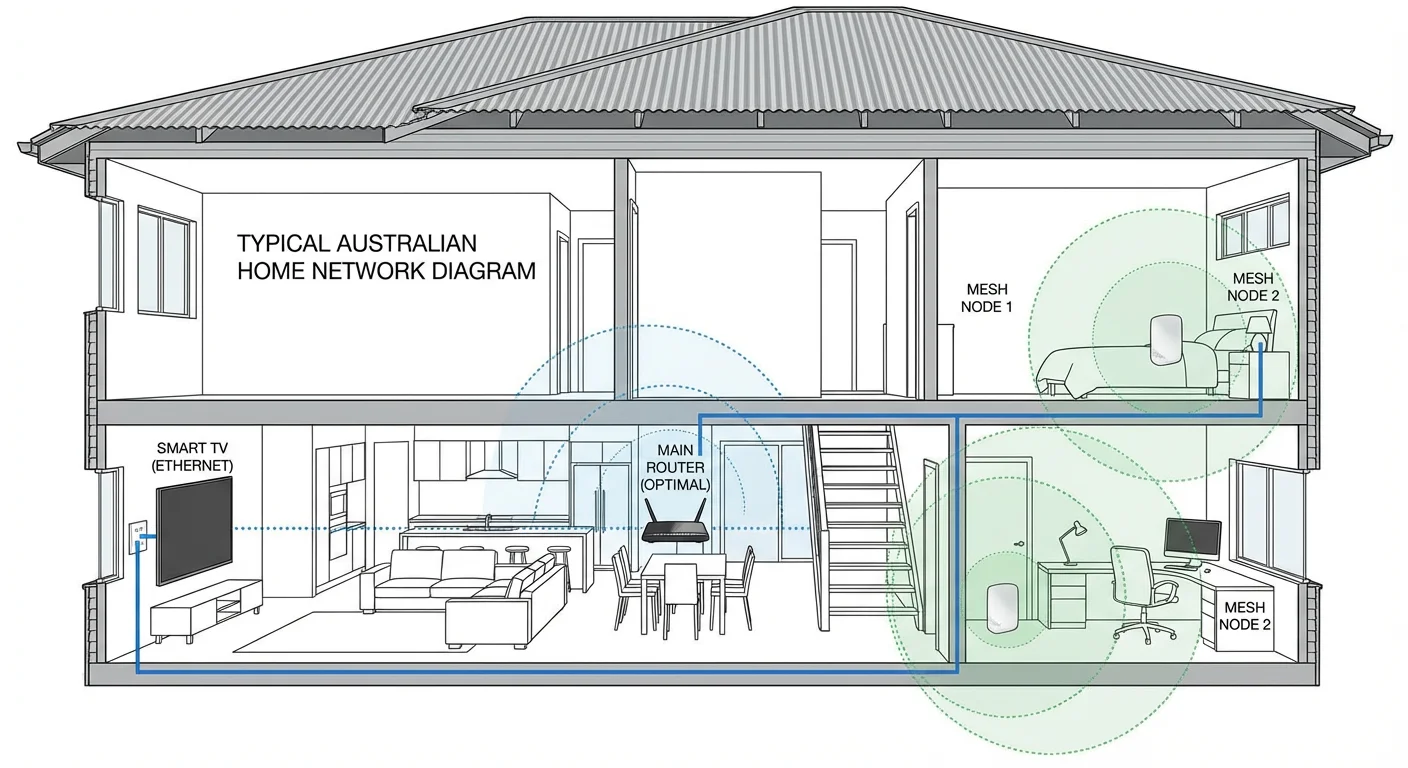
The most common streaming problems in Australia are buffering during peak hours, Wi-Fi dead spots, and app crashes on older devices. Most issues can be fixed by improving your home network setup, switching to ethernet where possible, and ensuring your streaming device has adequate processing power for HD or 4K content.
In testing across dozens of Australian households, I’ve found that the streaming service itself is rarely the problem. More often, it’s the home network—particularly Wi-Fi congestion, outdated routers, or too many devices competing for bandwidth. Here’s how to troubleshoot the most frequent issues.
Buffering during evening peak hours (7pm–10pm)
Why it happens: Australian internet traffic spikes dramatically in the evening. If your ISP is overselling bandwidth or your NBN tier is too low, you’ll notice slowdowns.
Fixes:
- Run a speed test at 8pm to check your actual bandwidth.
- If speeds are consistently below your plan’s advertised rate, contact your ISP.
- Consider upgrading your NBN tier if you’re on NBN25 and want HD streaming.
- Lower the streaming quality in the app settings during peak hours if buffering persists.
Wi-Fi weak spots and dropouts
Why it happens: Older routers, thick walls, and distance from the router all degrade Wi-Fi signal. Streaming devices far from the router often struggle.
Fixes:
- Use ethernet cable to connect your smart TV or streaming box directly to the router.
- If ethernet isn’t practical, invest in a mesh Wi-Fi system or Wi-Fi extender.
- Position your router centrally in the home, away from metal objects and microwaves.
- Switch your router to the 5GHz band for faster speeds (shorter range) or 2.4GHz for better range (slower speeds).
App crashes or freezes
Why it happens: Streaming apps are demanding. Older smart TVs or budget streaming sticks may lack the processing power for smooth 4K playback.
Fixes:
- Clear the app cache in your device settings.
- Uninstall and reinstall the streaming app.
- Check for firmware or app updates.
- If issues persist on an older smart TV, consider a dedicated streaming device like Fire Stick 4K or Chromecast with Google TV.
Delayed live sport compared to free-to-air
Why it happens: Internet streaming typically runs 30–90 seconds behind traditional broadcast due to encoding and buffering requirements.
Fixes:
- This is largely unavoidable with current streaming technology.
- Avoid checking social media during live matches if spoilers bother you.
- Some services offer a “low latency” mode—check app settings.
How to spot an illegal or risky IPTV provider
Illegal IPTV providers typically offer “too good to be true” pricing, lack transparent company information, and advertise access to premium content (like all sports and new movies) for a fraction of legitimate costs. Warning signs include crypto-only payments, anonymous operators, and claims of thousands of channels for under $10 per month.
Over years of evaluating streaming options, I’ve developed a checklist that helps identify whether a service is likely operating legally or running an unlicensed operation. No checklist is foolproof, but these red flags consistently appear with pirate services.

Red flags for illegal IPTV services
- Unrealistic pricing: If a service offers every sport, every movie channel, and thousands of channels for $5–$15 per month, it’s almost certainly not paying for licensing.
- No company information: Legitimate businesses have ABNs, contact details, and registered addresses. Pirate services often hide behind anonymous websites with no identifiable operator.
- Unusual payment methods only: Requiring cryptocurrency or gift cards while refusing standard credit card payments is a common pirate tactic to avoid chargebacks and tracing.
- Marketing through private Facebook groups or Telegram: Licensed services advertise openly. Pirate IPTV often relies on word-of-mouth through closed social media groups.
- Promises of “cracked” or “modded” apps: Any service requiring you to sideload unofficial APKs or use modified apps is almost certainly unlicensed.
- No free trial or unclear refund policy: Legitimate streaming services typically offer trials because they’re confident in their product. Pirate services often take payment upfront with no recourse.
Questions to ask before subscribing
- Can I find this company registered with ASIC or an equivalent business registry?
- Does the service have a legitimate website with clear terms of service and privacy policy?
- Are the prices in line with what licensed competitors charge?
- Can I pay with a standard credit card or PayPal?
- Does the service openly explain where its content comes from?
If the answer to most of these is “no,” proceed with extreme caution—or better yet, stick with established legal alternatives.
FAQ: Best IPTV Australia 2026
Is IPTV legal in Australia in 2026?
IPTV technology is legal in Australia. What determines legality is whether the specific service has licensing rights to the content it provides. Services like Kayo, Binge, Stan, and Foxtel Now are fully licensed and legal. Unlicensed services that stream pirated content operate illegally, and using them may expose you to legal and security risks. When in doubt, check whether the provider has transparent company details and realistic pricing.
How can I tell if an IPTV provider is legal or licensed?
Look for transparent company information including an ABN or business registration, a clear website with terms of service, realistic pricing comparable to known legitimate services, and standard payment options like credit cards. Suspiciously cheap pricing, anonymous operators, crypto-only payments, and access to premium content at a fraction of normal cost are warning signs of an unlicensed service.
What NBN speed do I need for IPTV or streaming in HD or 4K?
For reliable 1080p HD streaming, NBN50 is recommended, providing around 40–47 Mbps in real-world conditions. For 4K streaming, especially with multiple devices, NBN100 or higher is ideal. NBN25 can handle SD and occasional 720p but may struggle with HD during evening congestion. Always test your actual speed at peak hours rather than relying on advertised plan speeds.
Should I use a VPN with IPTV in Australia?
For legal, licensed IPTV and streaming services, a VPN is generally unnecessary and may actually degrade performance by adding latency. Some streaming services also block VPN connections due to licensing restrictions. VPNs are sometimes marketed alongside illegal IPTV to hide user activity, but this doesn’t make illegal streaming legal—it just adds a layer of obscurity. Focus on choosing licensed services rather than trying to hide your activity.
Are super-cheap IPTV subscriptions safe to use?
Services offering thousands of channels or all premium content for $5–$15 per month are almost certainly unlicensed and carry significant risks. These include unreliable streams that drop during important events, potential malware in unofficial apps, exposure of your payment details to anonymous operators, and possible legal consequences. Legitimate best IPTV Australia 2026 options like Kayo, Binge, or Stan offer transparent pricing, reliable service, and legal peace of mind.
Can I watch live AFL and NRL legally without Foxtel?
Yes. Kayo Sports offers live AFL, NRL, and many other sports for around $28–$35 per month without needing a full Foxtel subscription. This is a legal, licensed Foxtel alternative streaming option that works on smart TVs, Fire Stick, Android TV, and mobile devices. Stan Sport covers rugby union and tennis if those are your priorities. Free-to-air broadcasts on Seven, Nine, and Ten are also available through their free streaming apps.
What devices work with legal IPTV and streaming in Australia?
Most licensed streaming services support a wide range of devices including Samsung, LG, and Sony smart TVs, Amazon Fire Stick, Chromecast, Apple TV, Android TV boxes, gaming consoles (PlayStation, Xbox), and iOS/Android mobile devices. Fetch TV requires its own set-top box. Before subscribing, check the provider’s website for a current list of supported devices, as compatibility can change with app updates.
Why does my IPTV buffer even on fast NBN?
Buffering on fast connections typically indicates a Wi-Fi problem rather than an internet speed issue. Common causes include router distance, Wi-Fi interference from other devices, outdated router firmware, or too many devices on the network. Try connecting your streaming device via ethernet cable, moving your router to a central location, or upgrading to a mesh Wi-Fi system. If problems persist on ethernet, contact your ISP to check for line faults or congestion.
Conclusion
Choosing the best IPTV Australia 2026 option comes down to matching your viewing habits—sport, movies, or a bit of everything—with a licensed, reliable service that works on your NBN connection.
Legal streaming platforms like Kayo, Binge, Stan, and Foxtel Now have matured significantly, offering genuine alternatives to traditional pay TV without the lock-in contracts or exorbitant prices.
Steer clear of suspiciously cheap providers promising everything for next to nothing, as these carry real legal, security, and reliability risks.
Take the time to test your actual NBN speed during peak hours, consider which content matters most to your household, and don’t hesitate to use free trials before committing. For more help optimising your setup, explore our guides on fixing streaming buffering and choosing the right NBN plan for your home.
