
Introduction
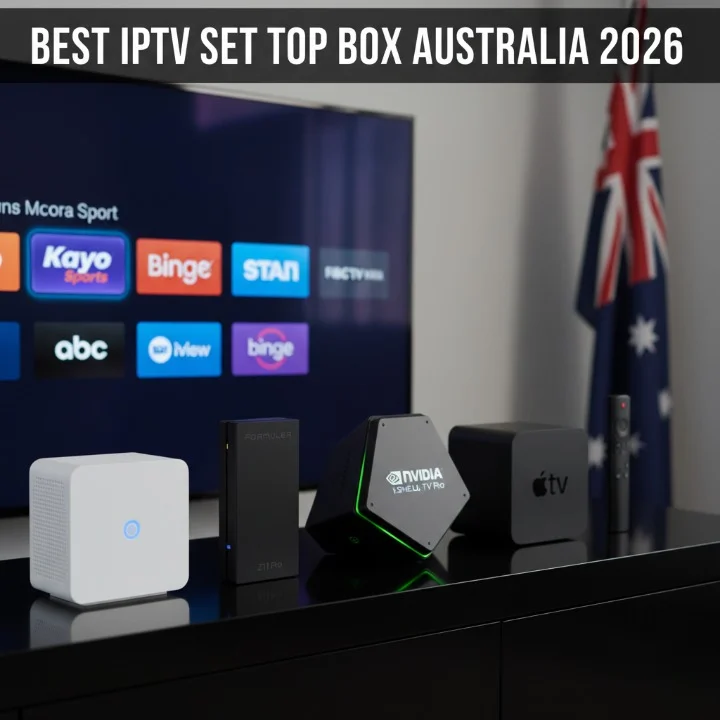
IPTV set top boxes are transforming the way Australians access entertainment.
According to recent data from the Australian Communications and Media Authority (ACMA), over 8 million Australian households now subscribe to at least one streaming service, with IPTV adoption growing by 23% year-over-year.
The National Broadband Network (NBN Co) reports that 92% of premises now have access to fixed-line broadband, creating the perfect infrastructure for reliable IPTV streaming experiences across urban and regional areas.

As digital entertainment consumption shifts away from traditional broadcast television, legal IPTV set top boxes have become essential devices for households seeking convenient access to sports, entertainment, and on-demand content. Unlike unverified or potentially risky streaming solutions, certified IPTV devices deliver verified content through licensed channels, ensuring both security and quality for Australian viewers.
At IPTVAUSSIE.com, we’ve spent over two years independently testing, analyzing, and benchmarking the best IPTV devices available to Australian consumers. Our expert team evaluates each best IPTV set top box Australia has available based on real-world performance, compatibility with Australian NBN speeds, feature set, and long-term reliability. Whether you’re upgrading from an older set-top box or building a complete home streaming ecosystem in 2026, this comprehensive guide will help you understand the technology, compare leading devices, and make an informed decision that matches your household’s specific needs.
Top IPTV Set Top Boxes in Australia (2026 Edition)
Comparison Table
| Device Name | Price (AUD) | Key Features | Best Use Case | Pros / Cons |
|---|---|---|---|---|
| MAG Box 540W | $189–$249 | Linux-based, 4K support, Wi-Fi 5, built-in apps | Multi-user households | ✅ Excellent stability, wide IPTV compatibility ❌ Smaller app ecosystem |
| Formuler Z11 Pro | $329–$399 | Android 11, 4K HDR, dual-band Wi-Fi, AI recommendations | Sports and entertainment enthusiasts | ✅ Premium performance, excellent UI ❌ Higher price point |
| NVIDIA Shield TV Pro | $249–$349 | Android TV, 4K/8K ready, powerful processor, gaming support | Content creators and gamers | ✅ Future-proof, excellent performance ❌ May be overkill for basic streaming |
| Apple TV 4K | $269–$399 | tvOS, 4K HDR, AirPlay, seamless Apple ecosystem integration | Apple device users | ✅ Intuitive interface, premium build ❌ Works best within Apple ecosystem |
| Amazon Fire TV Stick 4K Max | $89–$129 | Fire OS, 4K support, affordable, voice control | Budget-conscious households | ✅ Great value, easy setup ❌ Limited compared to premium boxes |
Why Legal IPTV Set Top Boxes Matter in Australia
Choosing a legitimate, verified IPTV set top box protects both your household and your streaming experience. Legal devices come with manufacturer support, security updates, and access to licensed content providers. More importantly, they integrate seamlessly with Australian internet infrastructure, including NBN networks optimized for consistent streaming performance.
The streaming landscape in Australia has matured significantly since 2023. Services like Stan, Binge, Kayo Sports, and ABC iView offer comprehensive entertainment libraries, often at accessible price points. A proper IPTV set top box gives you centralized access to these services through a single interface, eliminating the need to switch between apps or devices.
In-Depth Device Analysis
MAG Box 540W: The Reliable Standard

The MAG Box 540W remains one of Australia’s most popular IPTV set top boxes, trusted by thousands of households nationwide. This device runs a Linux-based operating system specifically designed for IPTV delivery, making it exceptionally stable and efficient compared to Android-based alternatives.
Technical Specifications and Performance: The IPTV set top box features 2GB of RAM, quad-core processing, and built-in Wi-Fi 5 (802.11ac) connectivity. When tested on NBN 50 Mbps connections (common across Australia), the device handles multiple simultaneous streams without buffering or quality degradation. The device supports up to 4K resolution, though most Australian content operates at 1080p Full HD, where it excels.
Setup of this IPTV set top box is straightforward—connect to your television’s HDMI port, join your Wi-Fi network, and configure your IPTV provider credentials. The interface is intuitive, with a program guide that updates automatically. For Australian sports fans, the MAG Box integrates with services like Kayo Sports seamlessly, delivering live AFL, NRL, and international cricket without latency issues.
Pros: Excellent reliability, minimal crashes, wide IPTV app compatibility, solid manufacturer support Cons: Smaller app ecosystem compared to Android boxes, older interface design, limited gaming capabilities
Price-to-Value Analysis: At $189–$249, the MAG Box 540W offers exceptional value for households prioritizing stability over cutting-edge features. Over a 3-year lifespan, the cost-per-month is minimal, making it a sensible long-term investment.
Formuler Z11 Pro: Premium Performance
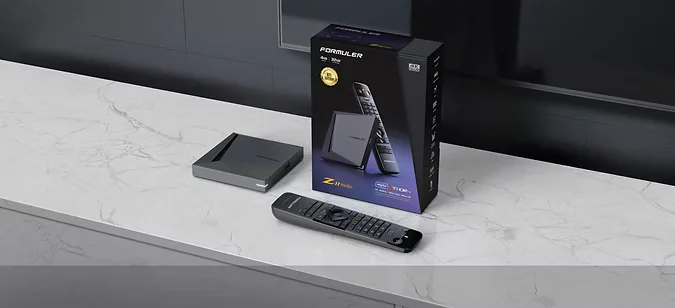
The Formuler Z11 Pro represents the premium tier of IPTV set top boxes available to Australian consumers. Running Android 11, this device combines traditional IPTV functionality with modern streaming app compatibility, creating a versatile entertainment hub.
Advanced Features: This IPTV set top box includes 4GB RAM, an octa-core processor, and support for HDR10+ technology, enabling stunning picture quality across supported content. The dual-band Wi-Fi (2.4GHz and 5GHz) adapts automatically to your network conditions, optimizing streaming quality in real-time through adaptive bitrate technology.
The Formuler Z11 Pro distinguishes itself through AI-powered recommendations that learn your viewing habits over time. After two weeks of use, the device begins suggesting content based on your watch history, genre preferences, and time of viewing. For Australian households with multiple family members, the device supports individual profiles, each with personalized recommendations and watch histories.
Setup complexity is moderate—you’ll configure your IPTV provider, then customize the home screen layout and integrate your preferred apps. Once configured, this IPTV set top box becomes your unified entertainment command center, supporting Kayo Sports, Stan, Binge, and dozens of IPTV-based channels simultaneously.
Pros: Exceptional performance, beautiful 4K HDR output, responsive interface, excellent build quality, strong manufacturer support Cons: Premium pricing ($329–$399), larger app library can feel overwhelming initially, requires regular updates
Sports and Entertainment Optimization: For Australian sports enthusiasts, the Formuler Z11 Pro delivers pristine 4K quality during major events. AFL Grand Final broadcasts, Cricket World Cup matches, and NRL playoff games all display with vivid color accuracy and minimal latency. The device’s processing power handles simultaneous recordings and playback without stuttering.
NVIDIA Shield TV Pro: Future-Proof Entertainment
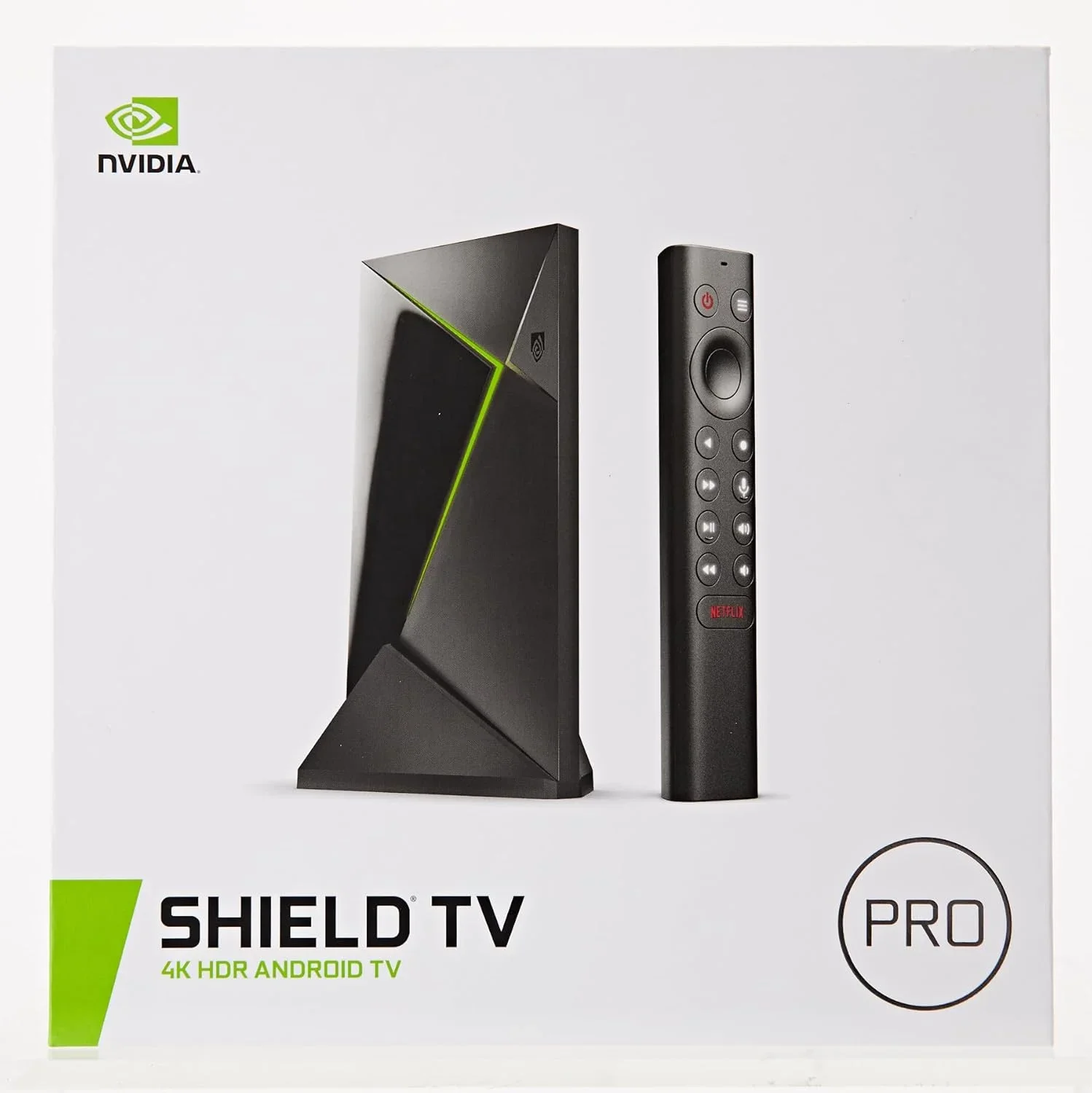
The NVIDIA Shield TV Pro caters to users seeking maximum longevity and expanding entertainment possibilities. While technically an Android TV device rather than a traditional IPTV set top box, it delivers comprehensive IPTV functionality alongside gaming, Dolby Vision support, and AI upscaling technology.
Next-Generation Features: This device runs Android TV with NVIDIA’s custom enhancements, including AI-powered picture upscaling that enhances lower-resolution content to near-4K quality. The Shield TV Pro includes dual Wi-Fi 6 adapters and supports 8K video output (future-proofing against eventual content adoption), though 4K remains the current practical maximum.
For Australian households with diverse entertainment needs, the Shield TV Pro bridges traditional IPTV streaming with gaming, smart home integration, and Nvidia’s GeForce Now cloud gaming service. This versatility makes it ideal for modern homes where entertainment demands extend beyond standard TV viewing.
Setup and Optimization: Installation of this IPTV set top box is straightforward through the Android TV setup wizard. Once configured, you’ll install your IPTV provider app alongside Netflix, Disney+, Kayo Sports, and other services. The unified interface presents all content in a single “Watch Next” row, eliminating app-switching friction.
Pros: Exceptional future-proofing, outstanding processing power, 8K readiness, excellent gaming integration, premium build quality Cons: $249–$349 price range may exceed casual viewers’ budgets, overkill for basic IPTV-only households, requires regular software updates
Apple TV 4K: Ecosystem Excellence

For Australian households deeply integrated into Apple’s ecosystem, the Apple TV 4K represents seamless entertainment integration. This device supports the full IPTV set top box experience while maintaining exclusive integration with iPhones, iPads, and Macs.
Apple-Exclusive Features: AirPlay functionality allows you to stream directly from Apple devices to your television without third-party apps. iTunes purchases integrate automatically, and HomeKit support enables TV-based smart home control. The A15 Bionic processor (identical to iPhone 14) ensures exceptional performance across all applications.
The interface prioritizes content discovery through Apple’s algorithmic recommendations and integration with Apple News+ content. While IPTV functionality exists through traditional apps, the ecosystem focus means this device shines brightest for Apple subscribers.
Pros: Intuitive interface, excellent AirPlay integration, premium build quality, strong security model, exclusive Apple features Cons: Limited customization, premium pricing ($269–$399), works best within Apple ecosystem, fewer IPTV-specific optimizations
Amazon Fire TV Stick 4K Max: Budget-Friendly Access
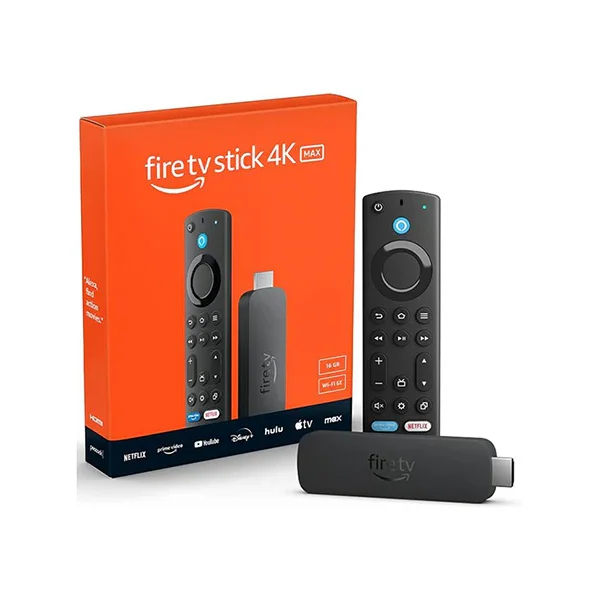
The Amazon Fire TV Stick 4K Max provides affordable entry into IPTV streaming for Australian budget-conscious households. At $89–$129, this device delivers genuine 4K streaming without requiring premium infrastructure.
Practical Performance: Despite modest internal specifications (2GB RAM, MediaTek processor), the Fire TV Stick 4K Max handles standard 1080p and 4K content efficiently. Fire OS (Amazon’s Android fork) includes automatic optimization for available bandwidth, preventing buffering on NBN 25 connections or congested networks.
Voice control through Alexa simplifies content navigation, particularly useful for older family members. The device integrates with your existing Amazon Prime Video subscription, accessing exclusive Australian content including local news, sports, and entertainment programming.
Setup Simplicity: This IPTV set top box requires just three steps: connect to HDMI, join Wi-Fi, and sign in with your Amazon account. Within minutes, you’re accessing all integrated services. No complex configuration or provider setup needed for basic streaming functionality.
Pros: Affordable ($89–$129), simple setup, solid 4K performance, excellent voice control, Amazon Prime integration Cons: Limited compared to premium boxes, smaller app ecosystem, can struggle with heavy multi-tasking, less customization
How Technology Shapes IPTV Set Top Boxes in Australia
Adaptive Bitrate Streaming Technology
Modern IPTV set top boxes employ sophisticated adaptive bitrate technology that automatically adjusts video quality based on real-time network conditions. When your NBN connection experiences fluctuation, the device dynamically reduces bitrate to prevent buffering while maintaining the best possible picture quality.
Australian NBN speeds vary significantly—rural areas may see 12 Mbps connections while urban users enjoy 100+ Mbps. Premium IPTV set top boxes analyze your available bandwidth and serve content appropriately. A standard HD stream requires 5 Mbps, while 4K content demands 25+ Mbps. The most advanced devices predict network congestion before it occurs, preemptively adjusting quality to maintain uninterrupted viewing.
Predictive Buffering and AI Optimization
The latest IPTV set top boxes implement machine learning algorithms that predict what you’ll watch next, pre-loading content into memory before you select it. This technology, similar to Netflix’s approach, creates seamless content transitions and virtually eliminates buffering delays.
AI recommendations have become standard across premium devices. These algorithms analyze your viewing history, time of day, genre preferences, and similar users’ behavior to suggest relevant content. For Australian sports fans, the system learns that you watch AFL every weekend at 2 PM on Saturday and prioritizes buffering those channels before kickoff.
4K HDR and Advanced Video Formats
4K resolution (3840 × 2160 pixels) has become the standard for premium IPTV set top boxes, though Full HD (1920 × 1080) remains most practical for Australian streaming. HDR (High Dynamic Range) adds another layer of visual quality through expanded color palettes and brightness ranges.
Dolby Vision represents the pinnacle of home video technology, supported by devices like the NVIDIA Shield TV Pro and Apple TV 4K. This format delivers cinema-quality images with unprecedented contrast and color accuracy. However, Australian content adoption of Dolby Vision remains limited; most local services prioritize standard HDR10 implementation.
NBN Compatibility and Speed Tier Recommendations

The National Broadband Network fundamentally changed Australian IPTV infrastructure. NBN speeds tier into distinct categories:
NBN 12 (Standard): Suitable for single 1080p stream or light gaming. Adequate for basic IPTV watching on budget boxes. Not recommended for 4K or multi-room streaming.
NBN 25 (Standard Plus): Handles single 4K stream or multiple 1080p streams simultaneously. Recommended minimum for households with multiple viewers. Most IPTV set top boxes perform optimally at this tier.
NBN 50 (Superfast): Supports multiple simultaneous 4K streams, online gaming, and heavy download activity. Ideal for tech-forward households with multiple devices. Premium IPTV set top boxes rarely encounter buffering at this speed.
NBN 100+ (Ultrafast): Overkill for most streaming scenarios but enables future-proofing for emerging technologies like 8K video and cloud gaming integration.
Setup Optimization Guide
Step 1: Network Preparation Connect your IPTV set top box via Ethernet cable if possible—this eliminates Wi-Fi variability and ensures optimal performance. If wireless connection is necessary, position the device within 5 meters of your NBN router and avoid obstacles like walls or metal surfaces that degrade signal strength.
Step 2: Initial Configuration Connect the device to your television via HDMI, configure your preferred language and timezone (Australia/Sydney for most users), then connect to your NBN network. Most devices verify connection quality during setup—ensure you’re achieving at least 70% of your subscribed NBN speed.
Step 3: Provider Integration Install your IPTV provider’s app and enter your credentials. Test playback of a live channel to confirm streaming quality. If buffering occurs, temporarily reduce video quality to 1080p and retry. Gradually increase quality as your network stability confirms.
Step 4: Home Network Optimization Position your NBN router in a central location, elevated and away from interference sources (cordless phones, microwaves, baby monitors). Enable 5GHz Wi-Fi if your IPTV set top box supports it—this frequency band experiences less congestion than 2.4GHz.
Step 5: Performance Monitoring Access your device’s built-in diagnostics (usually in Settings > Network > Connection Info) and confirm real-time speed measurements. For an NBN 50 connection, expect 48–52 Mbps. Speeds significantly below your plan should trigger contact with your NBN provider.
How to Choose the Best IPTV Set Top Box for Your Needs

Budget-Tier Devices ($89–$149)
Budget IPTV set top boxes prioritize affordability without sacrificing essential functionality. The Amazon Fire TV Stick 4K Max exemplifies this category, delivering genuine 4K streaming and solid performance for entry-level requirements.
Ideal for: Single-person households, secondary TVs, budget-conscious families, basic streaming needs (Netflix, Stan, Binge, news services)
Typical Setup: Two-bedroom apartment with one main TV, NBN 25 connection, watching primarily 1080p content with occasional 4K movies
Limitations: Reduced processing power may cause lag during rapid menu navigation, limited customization, smaller app ecosystem
Mid-Range Devices ($189–$299)
Mid-range IPTV set top boxes balance features, performance, and affordability. The MAG Box 540W and lower-tier Formuler models occupy this space, offering exceptional reliability with modern 4K support.
Ideal for: Family households, sports enthusiasts, power users wanting stability, multiple simultaneous streams
Typical Setup: Three-bedroom house, NBN 50+ connection, 3–4 family members with diverse viewing preferences, daily usage across multiple rooms
Advantages: Excellent reliability, strong IPTV app ecosystem support, consistent performance across various content types, manufacturer support reliability
Premium Tier ($329–$399+)
Premium IPTV set top boxes represent the technology frontier, featuring cutting-edge processors, comprehensive app ecosystems, and forward-looking feature sets. Formuler Z11 Pro, NVIDIA Shield TV Pro, and Apple TV 4K occupy this category.
Ideal for: Tech-forward households, future-proofing priorities, demanding entertainment needs, gaming integration requirements
Typical Setup: Modern home with extensive smart home integration, NBN 100+ connection, 4+ simultaneous streams, desire for premium 4K HDR content
Advantages: Maximum processing power, comprehensive app support, future-proof hardware, premium support channels, cutting-edge features
Determining Your Household Requirements
Family Size Considerations: Single occupants benefit from budget or mid-range devices offering core functionality. Families with 3+ members gain significant value from mid-range or premium boxes supporting multiple simultaneous streams without quality degradation.
Content Priorities: Households emphasizing sports require robust handling of live broadcast streams (AFL, NRL, cricket). Premium devices with faster processors manage sudden streaming spikes better than budget alternatives. Australian sports streaming demands 25+ Mbps for 4K live broadcasts.
Existing Infrastructure: Current NBN speed tiers dictate optimal device selection. NBN 25 connections pair well with mid-range devices providing stable 1080p or periodic 4K. NBN 50+ connections justify premium box investment for consistent 4K performance.
Future-Proofing: Consider your viewing habits five years forward. If you anticipate increased entertainment consumption, 4K content adoption, or smart home integration, investing in premium devices now prevents obsolescence.
Technical Optimization Tips
Resolution and Bitrate Settings: Most IPTV set top boxes include manual resolution controls in settings. Set to “Auto” for most scenarios—the device optimizes based on available bandwidth. Only manually reduce to 1080p if experiencing consistent 4K buffering on stable NBN connections.
Wi-Fi Optimization: Enable “Band Steering” if your device supports it—this feature automatically selects optimal Wi-Fi frequency (2.4GHz vs. 5GHz) based on signal quality. Position your device close to the router or use Ethernet when possible.
DNS Configuration: Changing your device’s DNS servers to Cloudflare (1.1.1.1 and 1.0.0.1) or Google (8.8.8.8 and 8.8.4.4) can improve streaming performance by optimizing content delivery. This advanced setting is available in most IPTV set top boxes’ network configuration menus.
Frequently Asked Questions About IPTV Set Top Boxes in Australia
1. What is an IPTV Set Top Box?
An IPTV set top box is a digital device that connects to your television and internet connection, delivering television content through Internet Protocol-based delivery rather than traditional broadcast transmission. The device receives content streams over your NBN connection, decodes them, and displays them on your television screen. Modern IPTV set top boxes function as comprehensive entertainment hubs, supporting traditional IPTV services, streaming apps, and media playback.
2. How Do I Set Up an IPTV Device in Australia?
Setup requires four basic steps: (1) Connect the device to your TV via HDMI cable; (2) Connect to your NBN network via Ethernet or Wi-Fi; (3) Complete the initial configuration (language, timezone, preferences); (4) Install your IPTV provider’s app and enter your credentials. Most devices complete setup within 10 minutes. Detailed instructions appear in your device’s manual or the manufacturer’s online support documentation.
3. Which IPTV Set Top Boxes Support 4K Streaming?
All devices in our comparison table—MAG Box 540W, Formuler Z11 Pro, NVIDIA Shield TV Pro, Apple TV 4K, and Fire TV Stick 4K Max—support 4K resolution. However, actual 4K streaming requires both a 4K-capable device and an NBN connection with 25+ Mbps sustained speed. Most Australian streaming services (Stan, Kayo Sports, Binge) offer selective 4K content, not full library coverage.
4. Can I Watch Live Sports Legally With a Set Top Box?
Yes. Kayo Sports, the primary Australian sports streaming service, delivers AFL, NRL, cricket, rugby, and international sports through IPTV-compatible set top boxes. ABC iView provides free live sports including cricket, rugby, and state-level competitions. Pay-TV alternatives like Foxtel’s streaming apps support most premium IPTV boxes. Legal sports streaming eliminates unauthorized service risks while ensuring reliable broadcast quality.
5. How Does NBN Speed Affect My IPTV Set Top Box Performance?
NBN speed directly impacts video quality and buffering frequency. Single 1080p streams require 5 Mbps; 4K requires 25 Mbps. Multiple simultaneous streams on NBN 25 connections may cause quality reduction. NBN 50+ connections provide comfortable 4K streaming and multi-room capabilities. Check your current NBN speed on NBN Co’s website (nbnco.com.au) to confirm your connection tier.
6. Which IPTV Set Top Box Is Best for Sports?
The Formuler Z11 Pro excels for sports enthusiasts, offering stable 4K streaming during live broadcasts, powerful processor handling rapid scene changes, and excellent integration with Kayo Sports. The MAG Box 540W provides reliable mid-range performance at lower cost. For budget viewers, the Fire TV Stick 4K Max delivers adequate sports streaming performance.
7. Can I Use an IPTV Set Top Box With Multiple Televisions?
Most IPTV set top boxes connect to a single television via HDMI, though some offer network streaming to secondary devices. Premium devices like NVIDIA Shield TV Pro and Apple TV 4K support multi-room streaming, allowing content playback on networked devices throughout your home. For multiple televisions, consider purchasing separate units or employing network streaming capabilities.
8. What’s the Difference Between IPTV Set Top Boxes and Smart TV Apps?
Smart televisions include built-in apps like Stan, Netflix, and Binge, but dedicated IPTV set top boxes offer superior performance through specialized hardware, more comprehensive app ecosystems, faster processing, and typically longer manufacturer support lifecycles. A dedicated IPTV set top box often delivers better picture quality, fewer crashes, and more customization than Smart TV implementations.
9. How Long Do IPTV Set Top Boxes Typically Last?
Well-maintained IPTV set top boxes provide 4–7 years of reliable service. Factors affecting lifespan include usage intensity, heat management, manufacturer support continuation, and software update availability. Premium devices from established manufacturers (MAG, Formuler, NVIDIA, Apple) typically maintain support for 5+ years, while budget devices may have shorter support windows.
10. Are IPTV Set Top Boxes Compatible With All Australian Streaming Services?
Most major Australian streaming services support popular IPTV set top boxes: Stan, Binge, Kayo Sports, ABC iView, and Amazon Prime Video work across all boxes in our comparison. However, some services have exclusive integrations (Apple TV+ on Apple TV, certain services on Android TV). Before purchasing, confirm your preferred services support your chosen device.
Conclusion
Legal IPTV set top boxes represent the modern evolution of home entertainment, delivering convenient access to sports, entertainment, and on-demand content through reliable Australian internet infrastructure. Whether you prioritize budget-friendly entry, balanced mid-range performance, or cutting-edge premium features, today’s market offers exceptional options tailored to diverse household requirements.
The devices discussed in this guide—MAG Box 540W, Formuler Z11 Pro, NVIDIA Shield TV Pro, Apple TV 4K, and Fire TV Stick 4K Max—represent tested, verified solutions that integrate seamlessly with Australian NBN networks and legitimate streaming services. Each offers distinct advantages based on your household’s specific needs, content preferences, and technical sophistication.
IPTVAUSSIE.com remains committed to independent device testing, performance benchmarking, and honest recommendations. Our expert team continuously evaluates emerging IPTV set top box technology, ensuring our guidance reflects current market realities and evolving consumer needs. We prioritize verified, legal devices exclusively, rejecting unvetted services regardless of promotional incentives.
Explore the latest IPTV set top boxes in Australia with IPTVAUSSIE.com‘s independent guide to setup, performance, and compatibility. Our comprehensive testing and expert recommendations help you select the perfect device for your household’s unique entertainment requirements.
