

Introduction
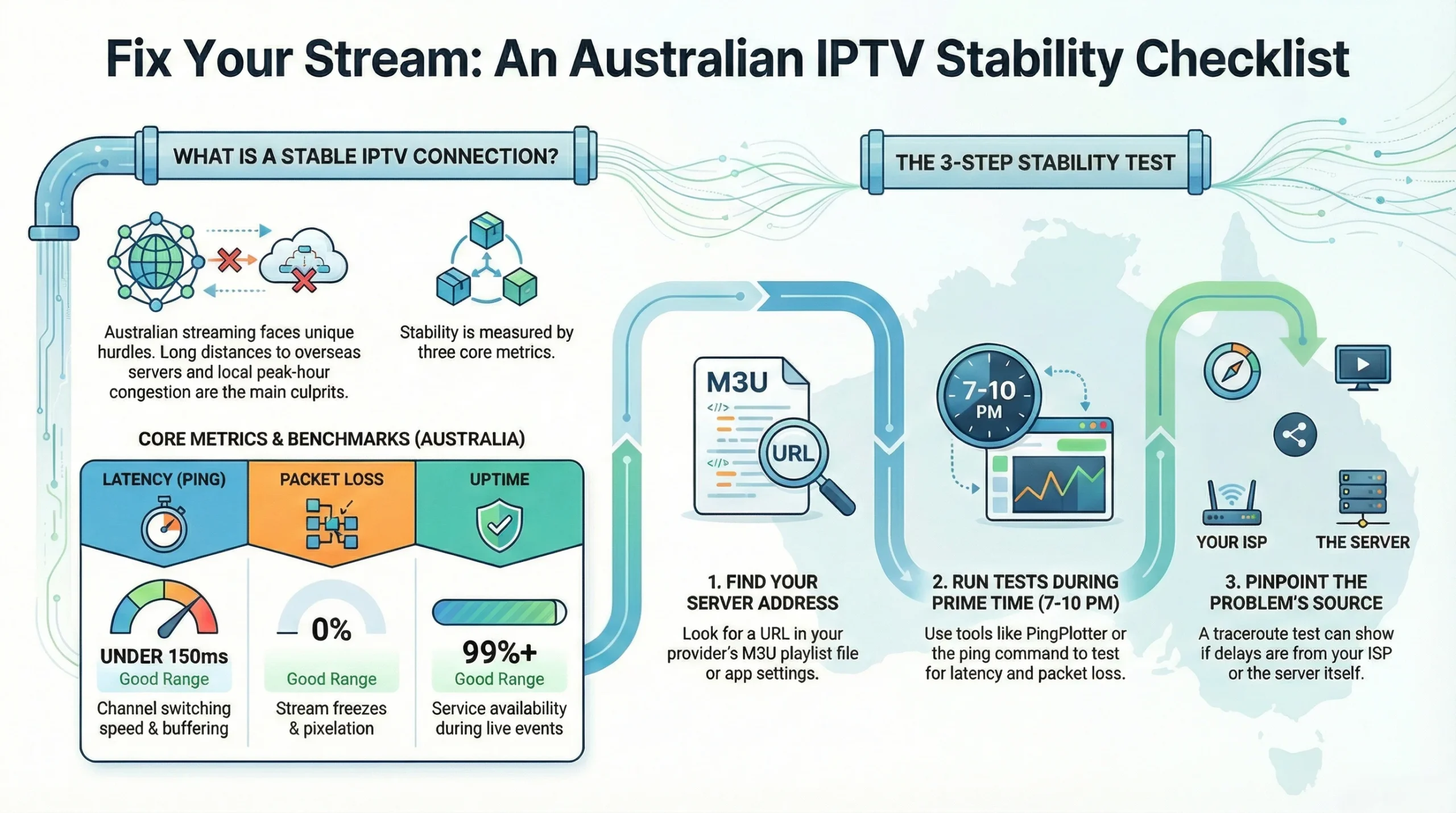
To check IPTV server stability, you need to measure three core metrics: latency (ping time), packet loss, and consistent bandwidth to the streaming server. Australian users face unique challenges—ISP variability between NBN connection types, international routing distances to overseas servers, and peak-hour congestion that hits hardest between 7–10 PM AEST.
If you’ve experienced buffering during prime-time viewing, sudden disconnections, or streams that work fine on one device but fail on another, these problems often trace back to server reliability issues rather than your home network.
This guide provides practical, tested methods for diagnosing IPTV server performance without the marketing fluff. You’ll learn exactly what to test, which free tools work in Australian conditions, and how to distinguish between server-side failures and local network problems.
What is IPTV Server Stability and Why Does It Matter?
Direct Answer: IPTV server stability refers to a streaming server’s ability to deliver continuous video data without interruptions, buffering, or quality degradation. Stable servers maintain consistent uptime (ideally 99%+), low latency under 150ms for Australian connections, and zero packet loss during transmission. Poor stability results in frozen screens, audio sync issues, and forced reconnections.
Key Stability Metrics Explained
| Metric | Good Range (Australia) | Poor Range | What It Affects |
|---|---|---|---|
| Latency (Ping) | Under 150ms | Over 300ms | Channel switching speed, buffer frequency |
| Packet Loss | 0–0.5% | Above 2% | Stream freezes, pixelation |
| Jitter | Under 30ms | Over 50ms | Audio-video sync, consistent playback |
| Uptime | 99%+ | Below 95% | Service availability during events |
Why Australian Users Should Care
- Geographic distance: Most IPTV servers sit in Europe, Asia, or North America—adding 200–400ms baseline latency before accounting for local network conditions
- NBN variability: FTTP connections handle streaming differently than FTTN or fixed wireless, affecting real-world performance
- Peak congestion: Australian networks experience significant slowdowns during evening hours, compounding server-side issues
User Scenario: The Weekend Sports Watcher
Mark in Brisbane uses IPTV to watch international football on Saturday nights. His stream works flawlessly at 2 PM but buffers constantly during the 8 PM match. The server itself hasn’t changed—but combined peak-hour ISP congestion and server load during popular events creates instability his afternoon tests never revealed.
How Can I Test IPTV Server Stability in Australia?
Direct Answer: Test IPTV server stability using network diagnostic tools that measure ping, traceroute, and sustained bandwidth to the specific server address. Free tools like PingPlotter, MTR (My Traceroute), and browser-based speed tests targeting the server region provide actionable data. Run tests at multiple times—especially during peak evening hours—to capture real-world conditions.
Essential Testing Tools
| Tool | Platform | What It Measures | Best For |
|---|---|---|---|
| PingPlotter | Windows, Mac | Latency, packet loss, route stability | Visual timeline of connection quality |
| MTR | Linux, Mac, Windows | Combined ping + traceroute | Identifying where packet loss occurs |
| Speedtest CLI | All platforms | Bandwidth to specific servers | Confirming throughput capacity |
| IPTV Smarters diagnostics | Android, iOS | Built-in server tests | Quick in-app checks |
| Wireshark | All platforms | Deep packet analysis | Advanced troubleshooting |
Testing Protocol for Accurate Results
- Obtain your IPTV server address from your provider’s playlist file (M3U) or app settings
- Run baseline tests during off-peak hours (morning/early afternoon)
- Repeat tests during peak hours (7–10 PM local time)
- Test across multiple days to account for weekly patterns
- Compare results from wired vs WiFi connections
What Good Results Look Like
- Ping remains stable (variation under 20ms between readings)
- No packet loss spikes above 1%
- Traceroute shows consistent hops without timeout nodes
- Bandwidth exceeds your stream quality requirements by 50%+
User Scenario: The Regional User
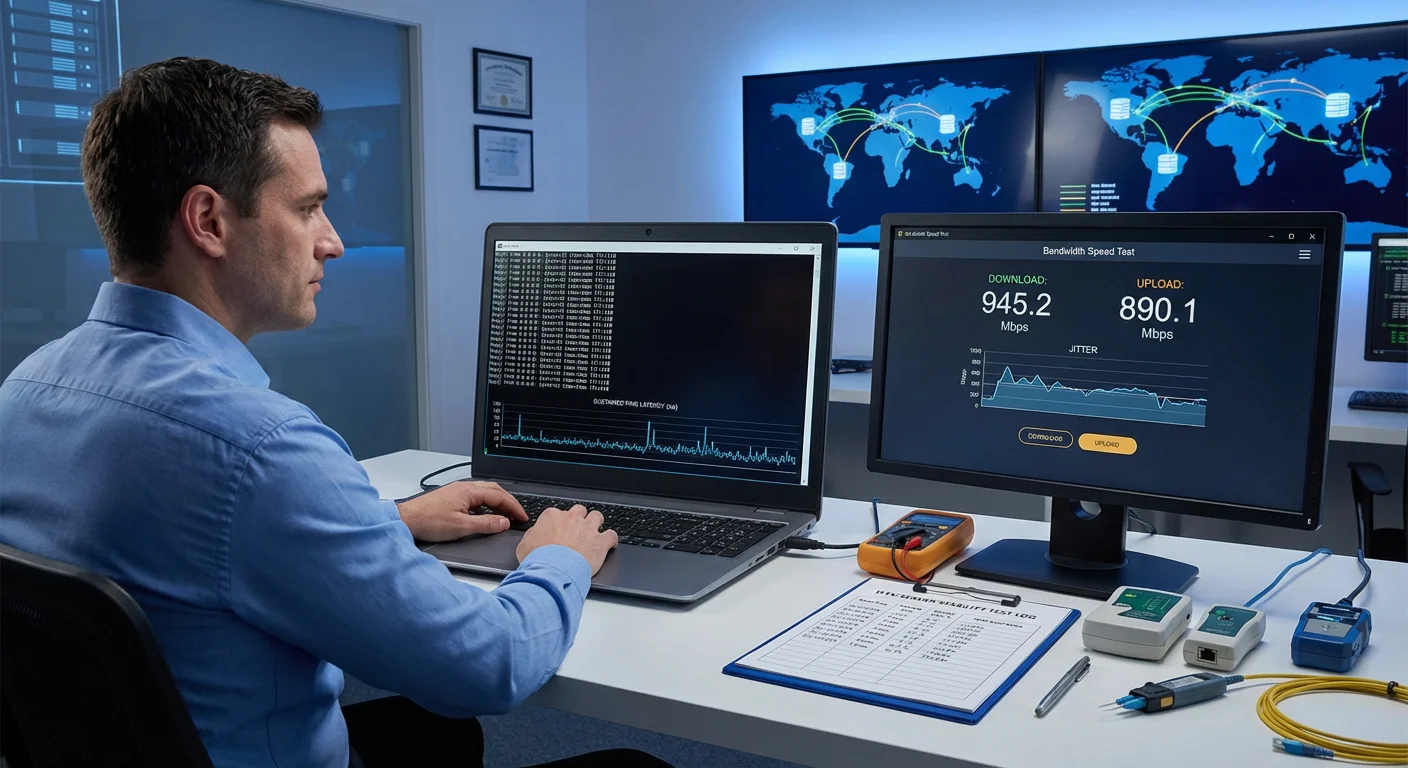
Sarah lives in rural Tasmania on a fixed wireless NBN connection. Her provider claims the IPTV service works Australia-wide, but her tests reveal 8% packet loss during rain and latency spikes to 450ms. By running MTR during a weather event, she documented that the issue occurs at the third hop—her local tower—not the IPTV server itself. This helped her request an NBN connection review rather than blaming the streaming service.
What Common Problems Affect IPTV Servers?
Direct Answer: IPTV servers commonly fail due to overloaded capacity during high-demand events, poor CDN infrastructure, inadequate bandwidth provisioning, and geographic server placement far from Australian users. Provider-side issues include overselling capacity, insufficient redundancy, and slow response to outages. These problems manifest as buffering, channel failures, and degraded video quality.
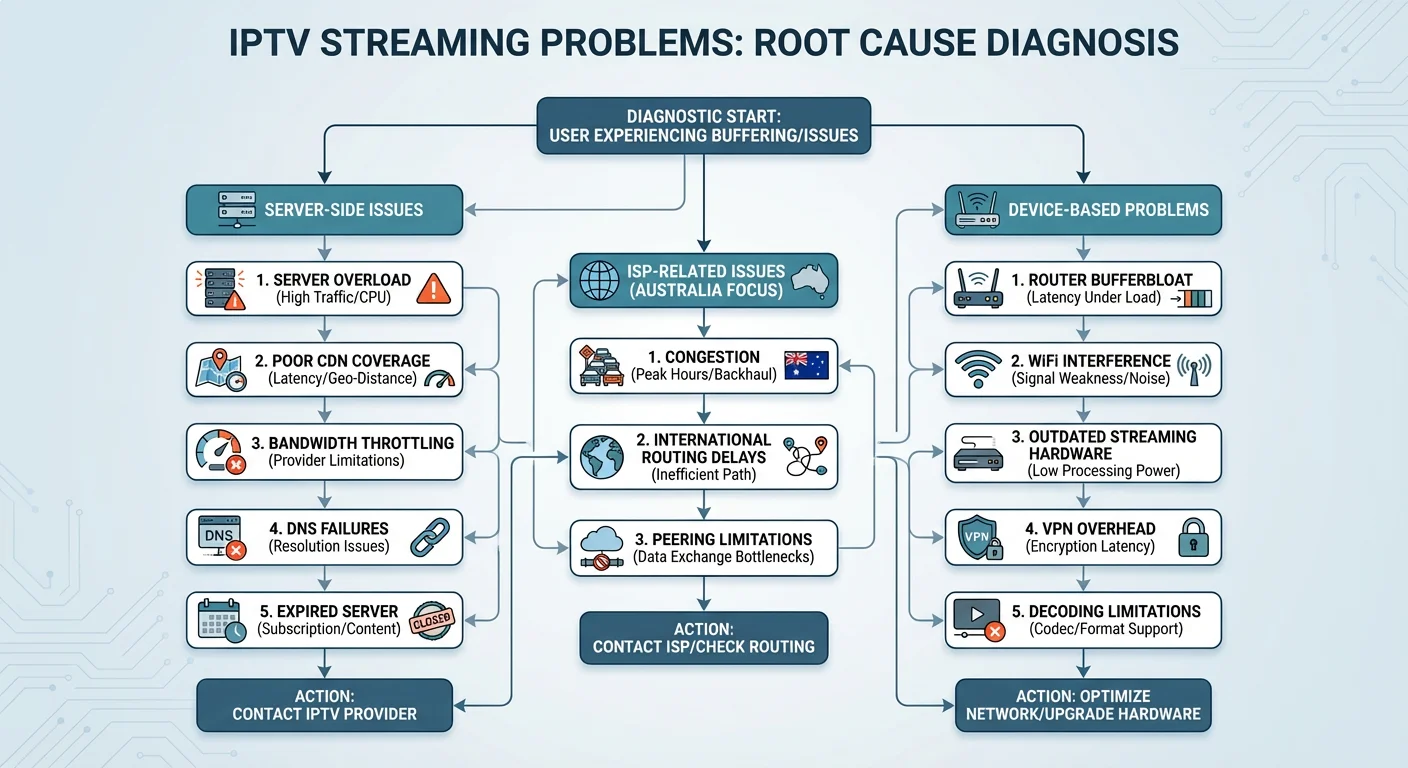
Server-Side Issues
| Problem | Symptoms | How to Identify |
|---|---|---|
| Server overload | Buffering during popular events, slow channel switching | Works fine off-peak, fails during matches/premieres |
| Poor CDN coverage | Consistent high latency regardless of time | Ping tests show 300ms+ even during quiet periods |
| Bandwidth throttling | Quality drops mid-stream, works initially | Streams start HD then degrade to SD within minutes |
| DNS issues | Intermittent complete failures | Some channels work while others timeout |
| Expired/rotated servers | Sudden complete service failure | Worked yesterday, nothing today |
Client-Side Issues Often Mistaken for Server Problems
- Router bufferbloat: Causes latency spikes when other devices use bandwidth
- WiFi interference: 2.4GHz congestion in apartment buildings
- Device limitations: Older streaming boxes with insufficient processing power
- ISP throttling: Some providers deprioritise streaming traffic during congestion
- VPN overhead: Encryption adds latency and reduces throughput
Australian-Specific Challenges
International routing: Australian internet traffic to European or US servers must traverse undersea cables with limited capacity. During peak hours, these routes congest independently of local network conditions.
ISP peering arrangements: How your ISP connects to international networks varies significantly. Telstra, Optus, and TPG use different peering points, meaning identical IPTV services can perform differently depending on your provider.
User Scenario: The Device Confusion
James in Melbourne tried IPTV on his 2018 Android TV box and experienced constant buffering. He assumed the server was unstable and complained to the provider. After testing the same service on his phone (flawless) and running diagnostics, he discovered his older box couldn’t decode HEVC streams efficiently—the server was fine, but his device created a bottleneck. Upgrading to a newer box solved the issue without changing providers.
How to Choose a Reliable IPTV Service?
Direct Answer: Choose reliable IPTV services by requesting trial periods, verifying server locations (closer to Australia is better), checking for multiple server redundancy, and reading recent user reports from Australian communities. Avoid providers making unrealistic uptime guarantees or offering suspiciously low prices with unlimited channels. Legitimate services provide transparent technical specifications and responsive support.
Reliability Indicators to Look For
| Green Flags | Red Flags |
|---|---|
| Offers trial period (24–72 hours) | No trials, requires annual payment upfront |
| Lists server locations/regions | Vague about infrastructure |
| Has multiple server options | Single point of failure |
| Active, recent user reviews | Only testimonials on their own site |
| Provides technical specs (bitrate, codec) | “Thousands of channels” without details |
| Responsive support channels | Email-only with slow response |
Questions to Ask Before Subscribing
- Where are your nearest servers to Australia?
- What redundancy exists if the primary server fails?
- What is your typical bandwidth per stream?
- How do you handle peak-event capacity?
- Can I test the service before committing?
Evaluating Trial Performance
During any trial period, test systematically:
- Morning: Baseline performance check
- Evening peak (7–10 PM): Real-world stress test
- Weekend sports/events: Maximum load conditions
- Multiple devices: Ensure compatibility across your household
- Different content: HD, 4K, and standard channels all behave differently
A Note on Legitimacy
IPTV services exist across a spectrum from fully licensed streaming platforms to unauthorised rebroadcasters. Australian communications regulations govern broadcasting and content distribution. Before subscribing, understand what you’re purchasing and ensure you’re comfortable with the service’s legal standing. Regulations in this space can evolve, so stay informed through official channels like the ACMA website.
Step-by-Step: Testing IPTV Server Stability
Direct Answer: Test IPTV server stability by extracting the server address, running sustained ping tests over 10+ minutes, performing traceroutes to identify problem hops, testing bandwidth capacity, and documenting results across multiple time periods. This systematic approach separates server issues from local network problems and provides evidence for support requests.
This video explains how frustrated IPTV and streaming users can turn into “network detectives” by collecting hard data instead of just rebooting the router and hoping for the best. It walks through a four-step plan: finding the server address, running three key tests (ping for latency and packet loss, traceroute to locate bottlenecks, and bandwidth/speed tests), logging results over time, and using clear patterns to push ISPs or streaming providers to fix overloaded servers.
Complete Testing Procedure
Step 1: Extract Your Server Address
From M3U playlist file:
Open your M3U playlist file using any text editor such as Notepad or TextEdit. Look through the file for web addresses that begin with “http://” or “https://”. The server address is the portion that appears before the port number, which is typically shown after a colon. For example, you might see something like “server.example.com:8080” where the server address is “server.example.com”.
From IPTV apps:
- Navigate to your app’s Settings menu and look for Server Information
- Search for fields labelled “Portal URL” or “Server Address”
- Be aware that some applications deliberately hide this information from users
Step 2: Run Baseline Ping Test
On Windows computers:
Open Command Prompt and type “ping” followed by “-n 100” and then your server address. This sends 100 test packets to measure connection quality.
On Mac or Linux computers:
Open Terminal and type “ping” followed by “-c 100” and then your server address. This performs the same 100-packet test.
How to interpret your results:
- Average time: Should be under 200 milliseconds for acceptable Australian performance
- Packet loss: Any loss above 1% indicates connection problems
- Variation: Large swings between readings suggest unstable routing
Step 3: Perform Traceroute Analysis
On Windows computers:
Open Command Prompt and type “tracert” followed by your server address.
On Mac or Linux computers:
Open Terminal and type “traceroute” followed by your server address.
What to look for in the results:
- Identify which hop (network point) shows the first significant latency increase
- Check whether any hops are timing out, shown as asterisks in the results
- Run the test multiple times to see if the route stays consistent
Step 4: Sustained Bandwidth Test
Use a speed testing tool that allows you to select a server in the same geographic region as your IPTV provider. This gives you a realistic measure of your connection capacity to that area.
Minimum bandwidth requirements by stream quality:
| Quality | Minimum Bandwidth | Recommended Bandwidth |
|---|---|---|
| SD (480p) | 3 Mbps | 5 Mbps |
| HD (720p) | 5 Mbps | 10 Mbps |
| Full HD (1080p) | 10 Mbps | 20 Mbps |
| 4K | 25 Mbps | 50 Mbps |
Step 5: Document and Compare
Create a simple log to track your results over time. Record the date, time of day, average ping, packet loss percentage, and any relevant notes about conditions during testing.
Example testing log:
| Date | Time | Ping (avg) | Packet Loss | Notes |
|---|---|---|---|---|
| Monday | 10 AM | 145ms | 0% | Baseline test |
| Monday | 8 PM | 189ms | 0.5% | Peak hour |
| Saturday | 8 PM | 267ms | 3% | During live match |
User Scenario: The Evidence-Based Complaint
Lisa in Sydney documented two weeks of test results showing consistent 4% packet loss every evening between 7:30–9:30 PM, while morning tests showed 0% loss. Armed with this data, she contacted her IPTV provider who acknowledged their Sydney-region server was overloaded and offered access to an alternative server. Her documented approach led to a real solution rather than generic troubleshooting advice.
Expert Overview: When Testing IPTV Servers Helps and When It Doesn’t
Direct Answer: Server stability testing helps most when diagnosing intermittent issues, comparing providers objectively, and documenting problems for support escalation. Testing provides limited value when server problems are obvious (complete outages), when issues stem from device limitations, or when your local ISP connection is fundamentally inadequate for streaming. Know when technical diagnostics add value versus when simpler solutions exist.
When Testing Provides Clear Value
✓ Intermittent problems: Issues that come and go benefit from documented pattern analysis
✓ Provider comparison: Objective data helps choose between services during trial periods
✓ Support escalation: Technical evidence strengthens your case with providers
✓ Isolating the cause: Distinguishes server issues from local network or device problems
✓ Peak-hour assessment: Reveals whether a service meets your actual usage patterns
When Testing Has Limited Benefit
✗ Complete outages: If nothing works, the problem is obvious—testing won’t help
✗ Known device limitations: Outdated hardware won’t improve with better diagnostics
✗ Fundamental bandwidth shortage: If your connection can’t support streaming, server testing is moot
✗ Temporary events: One-off issues during major global events aren’t representative
✗ Analysis paralysis: Endless testing delays simply trying a different approach
The Honest Assessment
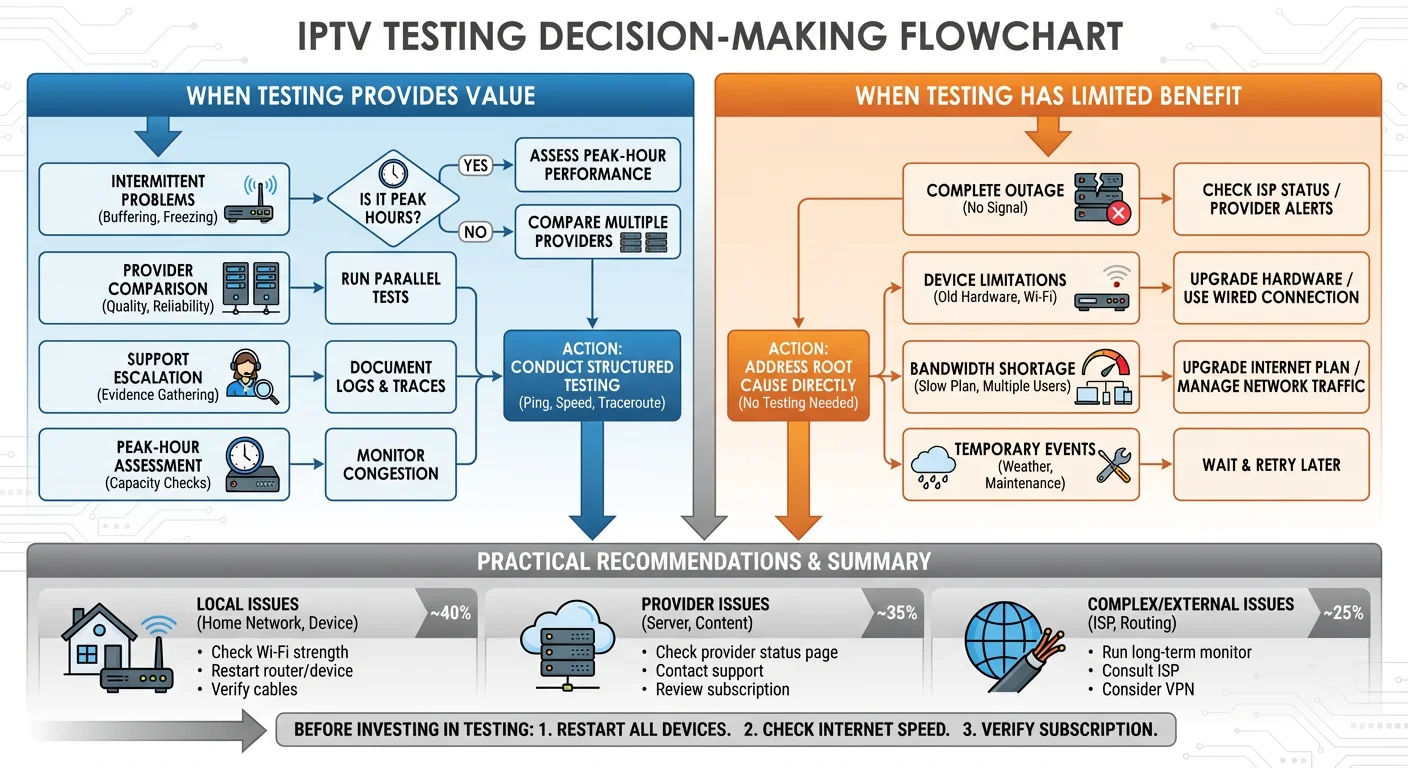
Most IPTV stability issues fall into predictable categories:
70% of problems trace to local factors: WiFi interference, router limitations, ISP congestion, or device capabilities. These don’t require server testing—they need local network improvements.
20% of problems relate to provider capacity: Server overload during peak times, inadequate infrastructure, or poor routing to Australian users. Testing confirms these issues but the solution is often changing providers.
10% of problems involve complex interactions: Specific ISP peering issues, regional routing anomalies, or intermittent server failures. These genuinely benefit from detailed diagnostic work.
Practical Recommendations
Before extensive testing:
- Confirm your internet speed meets minimum requirements
- Test with a wired connection to eliminate WiFi variables
- Try the service on a different device
- Check if the problem occurs at the same time daily
Invest in testing when:
- Simple troubleshooting hasn’t helped
- You need evidence for a support request
- You’re comparing services objectively
- Issues are inconsistent and hard to explain
FAQs
How do I check if my IPTV server is stable?
Check IPTV server stability by running a sustained ping test (100+ packets) to your server address and monitoring for packet loss above 1% or latency exceeding 200ms for Australian connections. Use tools like PingPlotter or MTR to visualise stability over time. Test during your typical viewing hours—stability during off-peak testing doesn’t guarantee peak-hour performance. Compare results across multiple sessions to identify patterns rather than relying on single tests.
What is the best way to test IPTV server stability in Australia?
The best Australian-specific approach combines three tests: First, ping your server address for 10+ minutes during evening peak hours (7–10 PM AEST). Second, run traceroute to identify which network segment causes latency—local ISP, international transit, or the server itself. Third, test actual streaming at various quality levels during real viewing times. Document results over several days to distinguish consistent problems from temporary issues. Regional users should test during varying weather conditions if using fixed wireless NBN.
Why does my IPTV buffer only during peak hours?
Peak-hour buffering typically results from compounded congestion: your local network, ISP infrastructure, international routing, and the IPTV server all experience higher load simultaneously. Australian evening hours overlap with peak times in other regions, stressing undersea cable capacity. Your service may work perfectly at 2 PM but fail at 8 PM because those conditions differ dramatically. Testing at your actual viewing times reveals real-world reliability rather than best-case performance.
Can my internet speed cause IPTV stability issues?
Yes—insufficient bandwidth is the most common cause of streaming problems misattributed to server instability. HD streams require 10+ Mbps of sustained, consistent throughput (not just peak speed). If other household devices share your connection, available bandwidth drops significantly. NBN connections, particularly FTTN and fixed wireless, may not deliver advertised speeds during congestion. Test your actual throughput to regional servers, not just to local speedtest nodes, for realistic expectations.
How do I know if the problem is my ISP or the IPTV server?
Isolate the cause by testing multiple destinations: If only your IPTV server shows poor performance while general internet and speedtests work normally, the server is likely at fault. If all international destinations show similar latency and loss, your ISP’s international routing is the bottleneck. Run traceroute—high latency appearing at early hops (within Australia) indicates ISP issues, while problems at later hops point to server-side infrastructure or international transit congestion.
What latency is acceptable for IPTV in Australia?
For Australian users connecting to overseas servers, latency under 200ms typically supports smooth streaming. Between 200–300ms, you may notice slower channel switching but acceptable playback. Above 300ms, buffering becomes more likely during any network fluctuation. These thresholds assume minimal packet loss—even 150ms latency becomes problematic with 2%+ packet loss. Servers closer to Australia (Singapore, Japan) generally deliver better latency than European or US-based infrastructure.
Should I use a VPN with IPTV services?
VPNs add latency (typically 20–50ms) and reduce throughput due to encryption overhead, potentially worsening stability issues. However, if your ISP throttles streaming traffic, a VPN might improve performance by preventing protocol-based throttling. Test both scenarios: run stability diagnostics with and without your VPN to determine which performs better for your specific ISP and IPTV combination. Australian users connecting to distant VPN servers will see more significant performance impacts than those using local VPN endpoints.
How often should I test my IPTV server stability?
Test whenever you notice new problems or after changes to your setup (new router, ISP plan change, IPTV provider update). For ongoing monitoring, weekly spot-checks during your typical viewing hours catch emerging issues before they become constant problems. During trial periods, test daily at varied times to ensure the service meets your needs across different conditions. Avoid over-testing—if your service works reliably, continuous diagnostics provide diminishing returns.
Conclusion
Understanding how to check IPTV server stability empowers Australian users to diagnose streaming problems accurately rather than guessing at solutions. The combination of geographic distance, ISP variability, and peak-hour congestion creates challenges unique to this region—but systematic testing reveals whether issues stem from servers, your local network, or factors in between.
Use the diagnostic methods outlined here to make informed decisions about providers and troubleshoot effectively when problems arise. Reliable IPTV streaming is achievable with the right approach: test at realistic times, document your findings, and address the actual cause rather than symptoms. When server stability genuinely fails to meet your needs, objective data helps you evaluate alternatives confidently.
