
Introduction
IPTV monthly plans have become a popular alternative to traditional cable and satellite TV for Australians looking to access live channels and on-demand content through their internet connection. With NBN coverage expanding and streaming habits shifting, many households are exploring whether IPTV fits their viewing needs—and their budget.
But not all IPTV services are created equal. Some operate within Australian consumer law, while others exist in legal grey areas that carry real risks. Add in factors like connection speed requirements, device compatibility, and variable service quality, and it’s clear why people have questions.
This guide cuts through the noise. You’ll find straightforward answers about how IPTV subscriptions work, what to watch out for, and how to make a sensible choice based on your situation—not marketing promises.
Quick Summary for Busy Readers
- What it is: IPTV delivers live TV and on-demand content over your internet connection via monthly subscription.
- Legal status: Licensed services (Foxtel Now, Fetch TV) are legal; unlicensed/grey-market providers are not.
- Minimum speed: NBN 50 for HD; NBN 100 recommended for 4K or multiple streams.
- Main risks: Buffering, disappearing channels, no refunds, potential malware with unlicensed apps.
- Smart approach: Use monthly billing, verify legitimacy, test before committing long-term.
What Are IPTV Monthly Plans and How Do They Work?
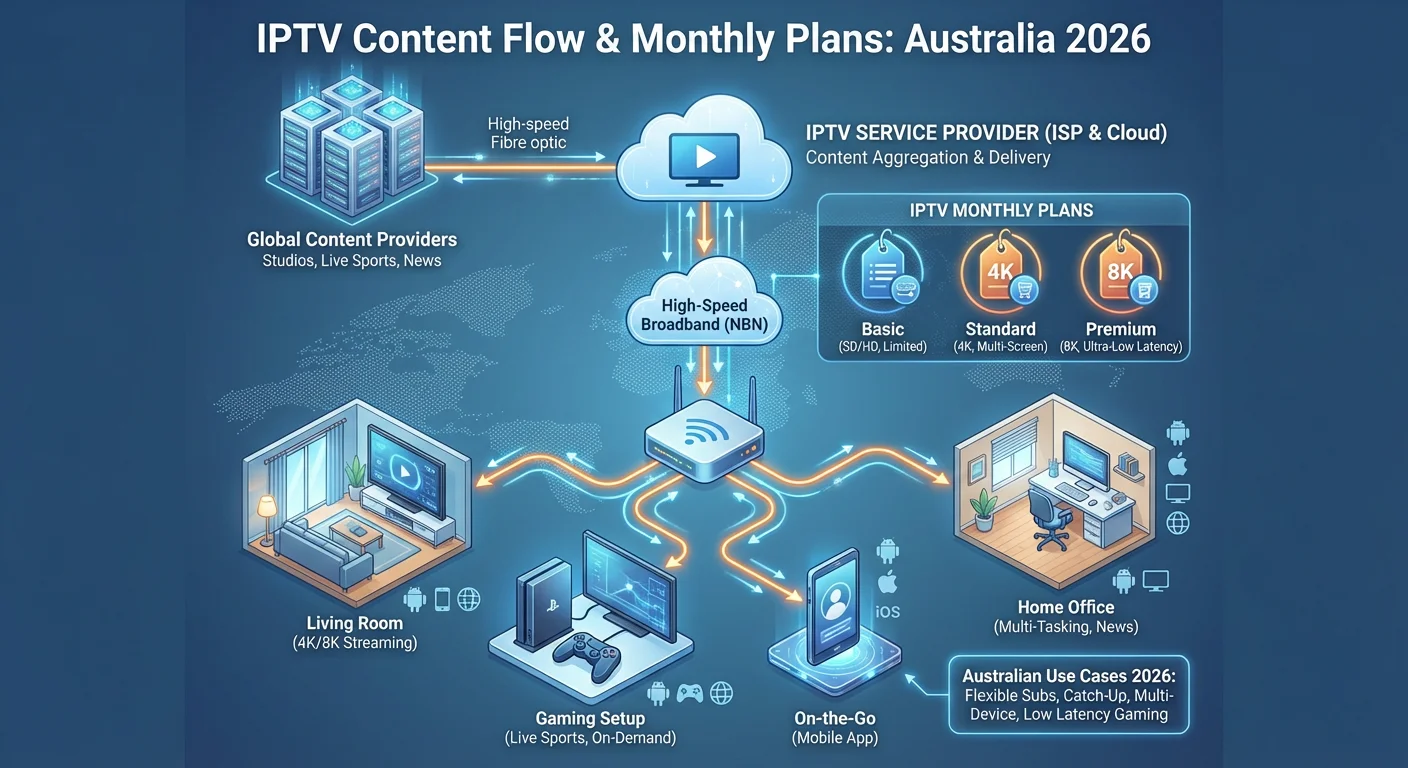
IPTV monthly plans deliver television content over your internet connection rather than through traditional broadcast signals, cable, or satellite. You pay a recurring subscription fee to access live TV channels, catch-up content, and often video-on-demand libraries through an app or set-top box connected to your home network.
How IPTV Works
- Content delivery: Streams are sent via internet protocol (IP) to your device, requiring a stable broadband connection—typically NBN or fixed wireless in Australia.
- Subscription model: Most services charge monthly, with some offering quarterly or annual options at reduced rates.
- Device compatibility: Works on smart TVs, Android TV boxes, Amazon Fire Stick, smartphones, tablets, and computers.
- Channel packages: Services bundle channels by category (sports, entertainment, international) or offer tiered plans.
- On-demand content: Many plans include catch-up TV and movie libraries alongside live channels.
Typical Use Cases
- Households wanting live sport without a Foxtel contract
- Viewers seeking international channels (European, Asian, Middle Eastern content)
- Cord-cutters combining IPTV with free-to-air and streaming apps
Realistic User Scenario
Sarah in Brisbane cancelled her Foxtel subscription after her contract ended. She wanted to keep watching Premier League matches but didn’t want another 12-month lock-in. She’s now researching IPTV monthly plans to see if they can deliver reliable sports streaming on her NBN 50 connection without buffering during peak times.
Are IPTV Monthly Plans Legal and Safe in Australia?
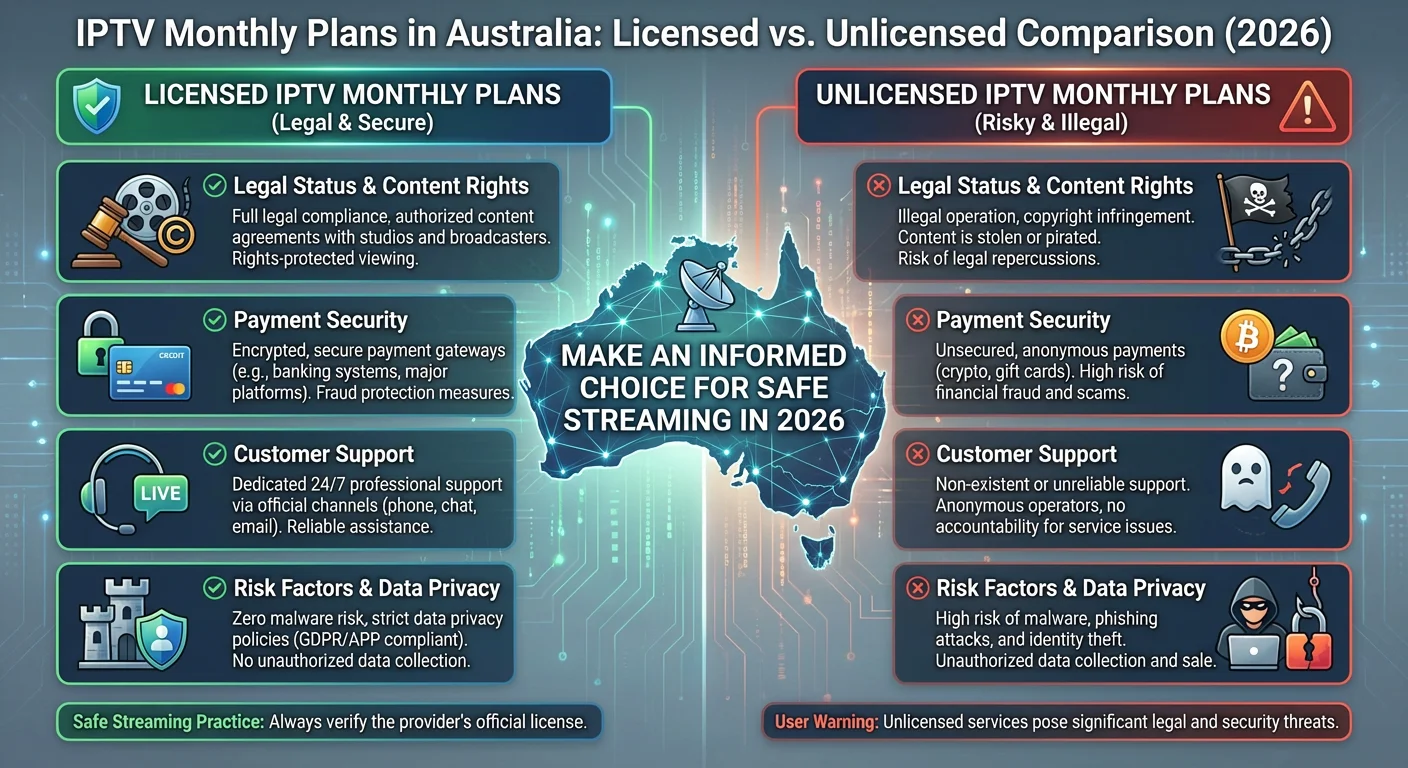
The legality of IPTV in Australia depends entirely on the provider. Licensed services operating with proper broadcasting rights are legal; unlicensed services streaming copyrighted content without permission are not. Australian copyright law applies, and the ACMA (Australian Communications and Media Authority) actively monitors illegal streaming operations.
Legal vs Unlicensed IPTV: Key Differences
| Factor | Licensed IPTV Services | Unlicensed/Grey-Market IPTV |
|---|---|---|
| Content rights | Holds broadcasting licences | Streams without permission |
| Legal status | Fully legal in Australia | Illegal under Copyright Act |
| Reliability | Consistent, supported infrastructure | Frequent outages, channel drops |
| Payment security | Secure, traceable payments | Often cryptocurrency or untraceable methods |
| Customer support | Accountable, local support options | Limited or non-existent recourse |
| Risk to user | None | Potential legal exposure, malware, data theft |
What the Law Says
Australia’s Copyright Act 1968 prohibits accessing content through services that don’t hold appropriate rights. While enforcement typically targets providers rather than individual users, using unlicensed services still carries risks. The ACMA and rights holders have increased efforts to block illegal IPTV operations, meaning services can disappear overnight—taking your subscription money with them.
Safety Concerns
Beyond legality, unlicensed IPTV apps often require sideloading, bypassing official app stores’ security checks. This increases exposure to:
- Malware embedded in unofficial apps
- Phishing through fake payment portals
- Personal data collection without consent
What Problems Do Australians Commonly Face with IPTV Services?
Australian IPTV users frequently encounter buffering during peak hours, channels disappearing without notice, and limited customer support—particularly with budget or grey-market providers. These issues often stem from overloaded servers, inadequate local infrastructure, and the inherent instability of unlicensed operations.
Common Issues and Root Causes
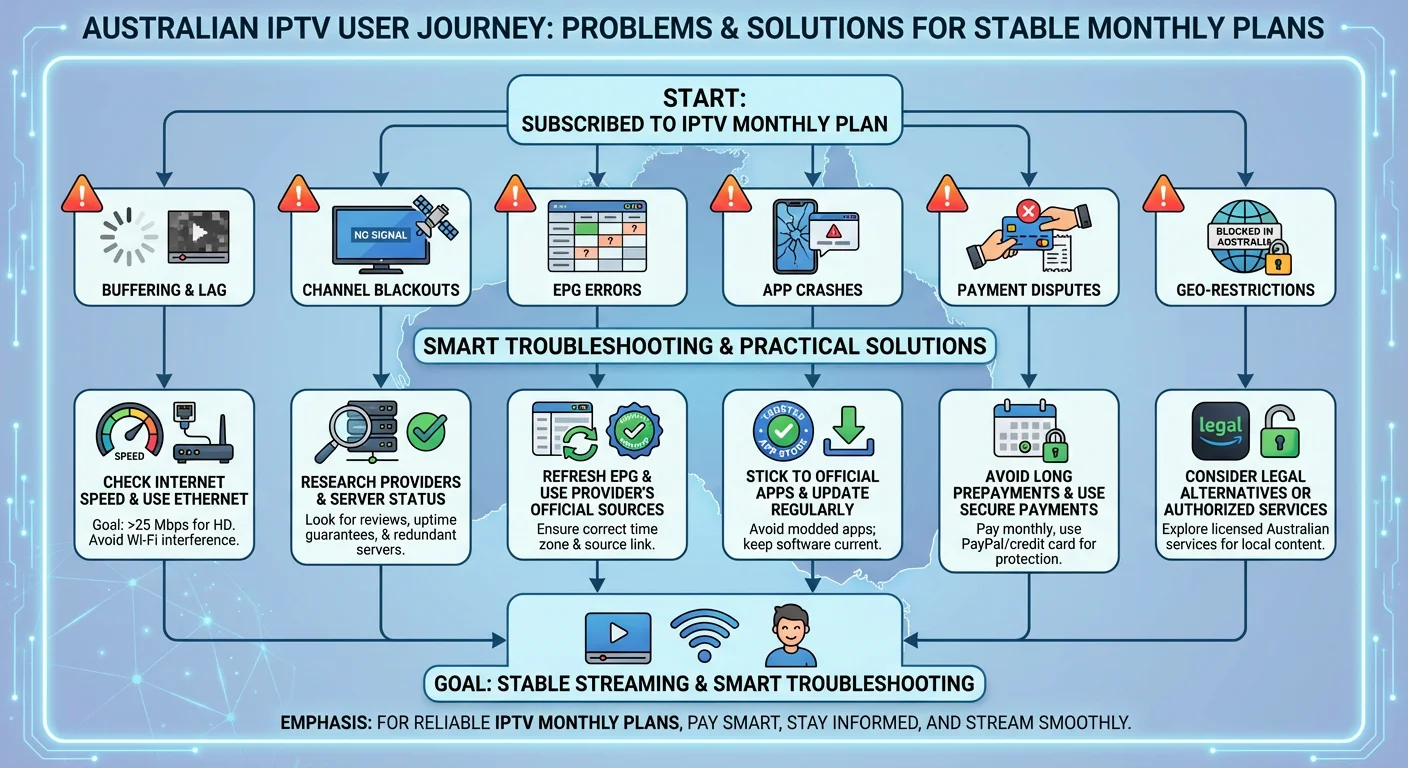
- Buffering and lag: Caused by insufficient server capacity, ISP congestion during peak times (7–10pm), or inadequate home internet speeds. NBN congestion in high-density areas compounds this.
- Channel blackouts: Rights holders issue takedowns; unlicensed providers lose access to streams; server locations change without warning.
- EPG (Electronic Program Guide) errors: Mismatched time zones, outdated guide data, or poor provider maintenance lead to incorrect listings.
- App crashes: Poorly coded apps, especially sideloaded APKs, conflict with device firmware or lack ongoing updates.
- Payment disputes: Providers operating offshore often ignore refund requests; chargebacks may be difficult with cryptocurrency payments.
- Geographic blocks: Some content remains geo-restricted even through IPTV; providers may falsely advertise channel availability in Australia.
Practical Solutions
- Check your connection first: Run speed tests during evening peak. NBN 50 (50Mbps) is generally minimum for reliable HD streaming; NBN 100 recommended for 4K or multiple streams.
- Use Ethernet over Wi-Fi: Direct cable connections reduce buffering caused by wireless interference.
- Research before subscribing: Look for recent user reviews specific to Australian access—services perform differently by region.
- Avoid long prepayments: Monthly plans protect you if a service degrades or disappears.
- Stick to official app stores: Reduces malware risk and ensures automatic updates.
Realistic User Scenario
David in Melbourne signed up for a cheap IPTV service advertised on social media. It worked well for two weeks, then started buffering constantly during AFL games. The provider blamed his internet, but his NBN 100 connection tested fine. When he requested a refund, the support chat stopped responding. The service shut down entirely a month later.
How Should Australians Choose an IPTV Plan in 2026?
Choosing an IPTV plan in Australia requires balancing content needs, budget, and risk tolerance. Prioritise providers with transparent business operations, verifiable Australian or regional presence, and flexible subscription terms.
Avoid services making unrealistic promises about channel counts or pricing.
Key Decision Factors
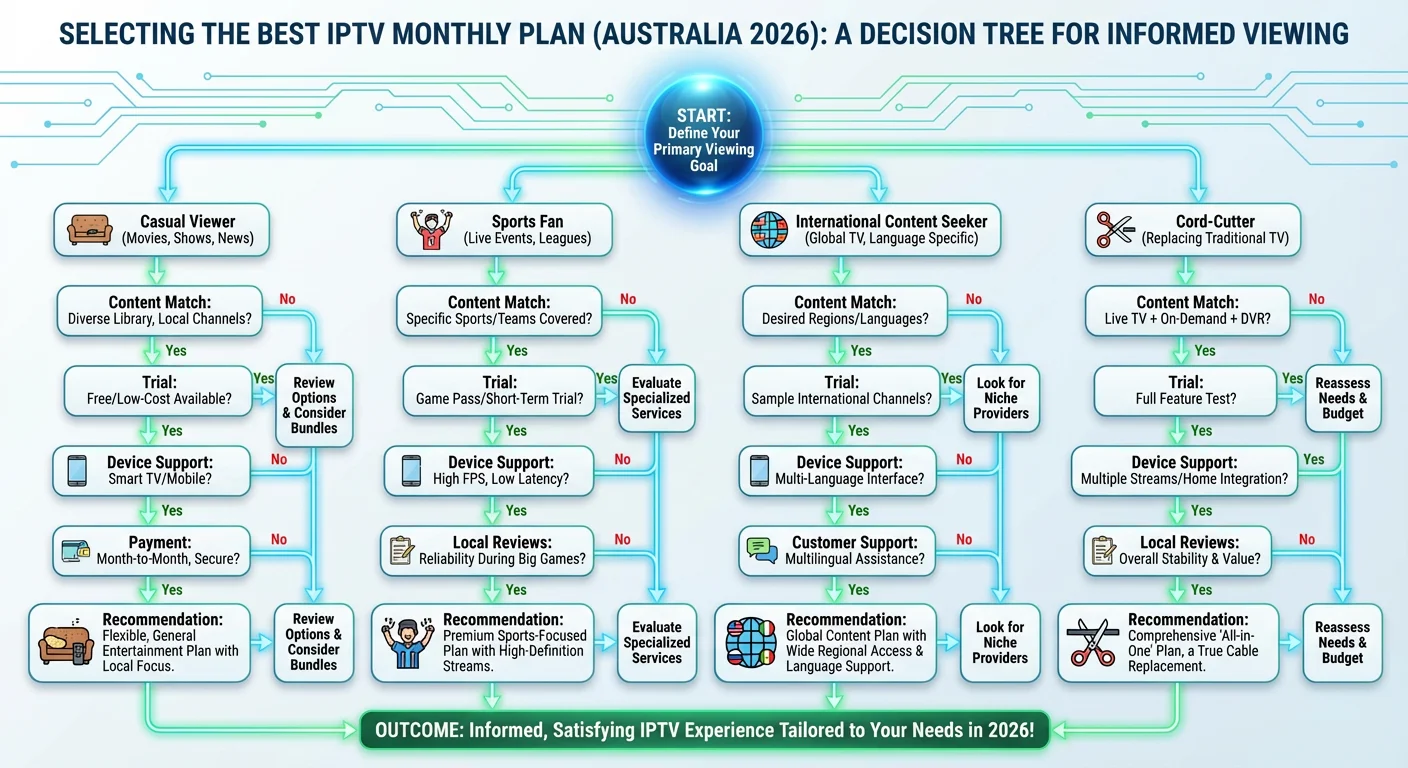
- Content match: Does the service actually carry the channels you want? Verify specific channels rather than trusting “10,000+ channels” claims—many are duplicates or dead links.
- Trial availability: Legitimate services often offer short trials or money-back periods. Be wary of providers demanding long commitments upfront.
- Payment methods: Secure, traceable payment options (credit card, PayPal) indicate accountability. Cryptocurrency-only services are harder to dispute.
- Device support: Confirm compatibility with your specific devices. Official apps on major platforms suggest legitimate operation.
- Local reviews: Australian-specific feedback matters—server performance and content availability vary by region.
- Customer support: Test responsiveness before committing. Email a question and note how long a reply takes.
User Type Comparison
| User Type | Budget Priority | Key Need | Recommended Approach |
|---|---|---|---|
| Casual viewer | Low–moderate | Basic entertainment, some live TV | Free-to-air + one mainstream streaming service; consider licensed IPTV add-on for specific channels |
| Sports fan | Moderate–high | Reliable live sports without dropouts | Licensed sports streaming (Kayo, Stan Sport, Optus Sport) or verified IPTV with sports focus |
| International content seeker | Varies | Specific language/regional channels | Research community recommendations for your language; verify channels are actually available in Australia |
| Cord-cutter | Low | Maximum content, minimum cost | Combine free-to-air, free streaming tiers, and one paid service; IPTV as supplement only if legal options lack specific content |
Realistic User Scenario
Priya in Sydney wants to watch Indian news and cricket for her parents visiting from overseas. She’s found several IPTV services advertising Indian channels, but pricing ranges from $10 to $50 monthly. After checking forums, she discovers the cheapest options frequently lose channels mid-tournament. She opts for a mid-priced service with a 7-day trial and monthly billing, allowing her to cancel if quality drops.
How to Set Up an IPTV Service Step by Step
Setting up IPTV typically involves subscribing to a provider, downloading their app or configuring a compatible player, entering your account credentials, and adjusting settings for your connection.
Most setups take under 15 minutes if you have your login details and a compatible device ready.
Step-by-Step Setup Process
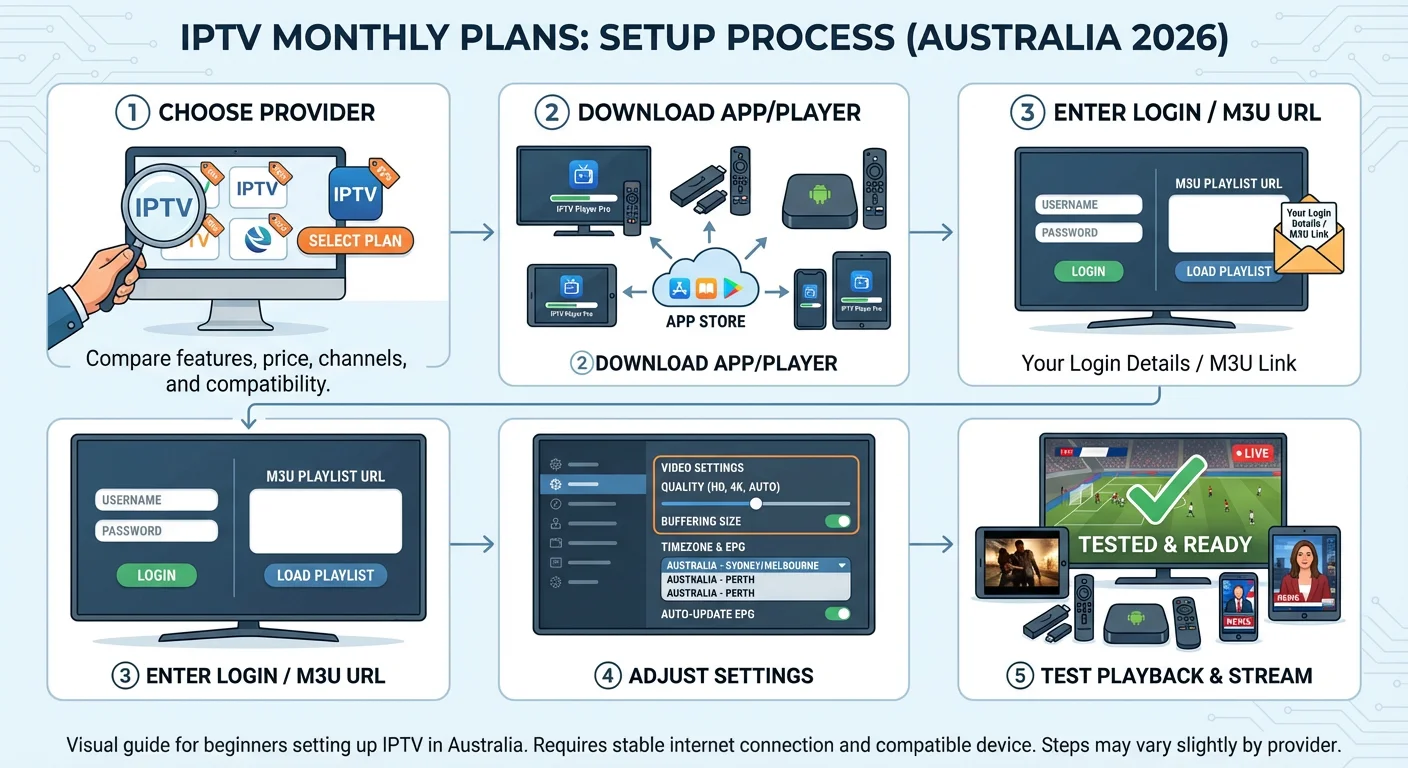
- Choose and subscribe to a service
- Select a provider after researching reviews and verifying legitimacy. Complete payment through their website—you’ll receive login credentials or an M3U playlist link via email.
- Download the provider’s app or a compatible IPTV player
- For official apps: download from Google Play, Apple App Store, or Amazon Appstore.
- For M3U-based services: use players like TiviMate, IPTV Smarters, or VLC (ensure you download from official sources only).
- Enter your credentials or playlist URL
- Log in with the username/password provided, or paste the M3U URL into your player’s settings under “Add Playlist.”
- Configure settings for your setup
- Set your timezone to AEST/AEDT for accurate EPG.
- Adjust video quality based on your connection (auto, 720p, 1080p).
- Enable hardware decoding if available for smoother playback.
- Test playback and troubleshoot
- Try several channels across categories. If buffering occurs, switch to lower quality or check your network. Restart your router if problems persist.
Device-Specific Tips
- Amazon Fire Stick: Enable “Apps from Unknown Sources” in settings if sideloading; use Downloader app for APK installation.
- Android TV boxes: Stick to boxes with Google certification for better app compatibility and security updates.
- Smart TVs (Samsung/LG): Native app availability varies; you may need an external streaming device.
- iPhones/iPads: App Store restrictions mean fewer IPTV player options; GSE Smart IPTV and IPTV Smarters are commonly used.
When Does IPTV Actually Help—and When Doesn’t It?
IPTV works well for accessing niche content unavailable through mainstream Australian services, consolidating multiple channel types into one interface, and avoiding long-term contracts. It’s less suitable when you need guaranteed reliability for major events, prefer local customer accountability, or want the simplest possible setup.
Situation Analysis
| Situation | Does IPTV Help? | Explanation |
|---|---|---|
| Watching specific international channels unavailable in Australia | Often yes | IPTV can fill gaps in local streaming libraries, particularly for non-English content |
| Reliable live sport during major events (Grand Final, World Cup) | Mixed | Licensed services more reliable; unlicensed IPTV prone to overload and takedowns during high-demand events |
| Replacing Foxtel entirely | Depends | Works for some content, but premium exclusives (HBO via Binge, specific sports) may require licensed alternatives |
| Household with varying tech comfort | Often no | Setup complexity and troubleshooting requirements frustrate less technical users |
| Temporary access (e.g., visiting relatives wanting home-country TV) | Often yes | Monthly flexibility suits short-term needs without lock-in contracts |
| Maximising value on a tight budget | Risky | Cheap services often underdeliver; free-to-air plus affordable licensed streaming may be more reliable |
| Accessing paywalled news channels | Sometimes | Depends on whether provider legitimately carries specific news networks |
When to Consider Alternatives
- Kayo/Stan Sport/Optus Sport: More reliable for Australian sports with legitimate rights
- SBS On Demand: Free access to international films and some foreign-language programming
- Binge/Stan/Netflix: Better for on-demand movies and series than most IPTV libraries
- Free-to-air apps (7plus, 9Now, 10 Play): Catch-up content at no cost
Realistic User Scenario
Tom in Perth set up IPTV hoping to watch every Premier League match cheaply. During the first big match day, the stream froze repeatedly while servers were overloaded. He ended up subscribing to Optus Sport for reliable EPL coverage and now only uses IPTV for international news channels his grandmother enjoys—a use case where occasional dropouts matter less.
FAQ
What internet speed do I need for IPTV monthly plans in Australia?
For standard definition, 5–10 Mbps is sufficient. HD streaming requires 15–25 Mbps, while 4K content needs 50 Mbps or more. However, these are minimums—real-world NBN performance during peak evening hours often drops below advertised speeds.
Testing your actual evening speeds before subscribing helps avoid disappointment. Using a wired Ethernet connection rather than Wi-Fi also improves stability.
Can I use IPTV monthly plans on multiple devices simultaneously?
This depends entirely on your provider’s terms. Some services allow 1–2 concurrent streams on a basic plan, with higher tiers permitting more. Unlicensed services often advertise unlimited connections but may throttle or block accounts using too many.
Check the specific policy before assuming household-wide access—and be aware that sharing login details outside your household typically violates terms of service.
Why do IPTV channels disappear or stop working?
Channels vanish for several reasons: rights holders issue takedown notices; source streams change or get blocked; providers lose access to their content sources; or server infrastructure fails.
This happens more frequently with unlicensed services lacking stable content agreements. If a channel you specifically subscribed for disappears, your practical recourse depends on the provider’s refund policy—which is often limited or nonexistent with grey-market operations.
Are there legitimate IPTV services operating in Australia?
Yes, though they’re less common than grey-market alternatives. Foxtel Now, Fetch TV, and various telecommunications company bundles use IPTV technology to deliver content legally.
Some international providers also hold proper licences for Australian distribution. The distinction is whether the service has actual broadcasting rights for the content it offers—not just technical capability to stream it.
What happens if an IPTV provider I paid for shuts down?
With unlicensed providers, your money is typically gone. These services often operate offshore with no Australian business registration, making legal recourse impractical.
Credit card chargebacks may be possible within limited timeframes, but cryptocurrency payments are essentially unrecoverable. This risk is why experienced users recommend monthly billing and avoiding large upfront payments regardless of discount offers.
How do IPTV monthly plans compare in price to Foxtel or other services?
Unlicensed IPTV services typically range from $10–30 monthly, significantly cheaper than Foxtel’s packages ($49–$104+). However, direct price comparison ignores reliability differences, legal risk, and the value of customer support.
Licensed IPTV and streaming alternatives like Kayo ($25–35), Stan ($12–22), or Binge ($10–18) offer middle-ground options with better reliability than grey-market IPTV at lower cost than full Foxtel subscriptions.
Is using a VPN with IPTV legal in Australia?
Using a VPN is legal in Australia. However, using a VPN to access geo-restricted content may violate the streaming service’s terms of service—potentially resulting in account termination.
It doesn’t change the underlying legality of the content itself: accessing unlicensed streams through a VPN is still copyright infringement. VPNs also add latency, which can increase buffering with live streams.
Can my ISP see that I’m using IPTV services?
Your ISP can see you’re streaming video data and may identify traffic patterns associated with IPTV use, though they typically can’t see specific content without deep packet inspection.
Australian ISPs generally don’t actively monitor individual streaming habits, but they do respond to court orders and rights holder requests. A VPN encrypts traffic from your ISP’s view but doesn’t provide complete anonymity.
Conclusion
IPTV monthly plans offer Australian viewers flexibility and access to content outside mainstream streaming options, but they come with meaningful trade-offs in reliability, legality, and consumer protection.
Understanding the difference between licensed services and grey-market alternatives is essential before subscribing.
For most Australians, a combination of free-to-air, affordable licensed streaming services, and perhaps a carefully chosen IPTV add-on for specific niche content delivers better value than relying on IPTV alone.
Whatever you choose, monthly billing, realistic expectations about reliability, and awareness of the legal landscape will help you make a decision that actually suits your viewing habits—not just your budget.
Before choosing any IPTV service, compare legal options available in Australia and test with monthly billing first.
